May 16, 2026
Fitness Video Organizer 2026: Stop Scrolling, Find Any Workout Fast
May 16, 2026
Fitness Video Organizer 2026: Stop Scrolling, Find Any Workout Fast
May 16, 2026
Fitness Video Organizer 2026: Stop Scrolling, Find Any Workout Fast
There’s a familiar screen many fitness fans wake up to: a growing folder of saved clips from Instagram, TikTok, YouTube, and Facebook that promised inspiration — but now only creates chaos. Fitness Video Organizer 2026: Stop Scrolling, Find Any Workout Fast is about solving that exact pain. This article explains why saved workout videos turn into clutter, why people rarely follow them, and how FitSaver — a workout organizer app — converts short social clips into practical, followable routines so users can plan and train without distraction.
Why Saved Workout Videos Become Chaos
Saving a workout video feels productive. It’s a digital bookmark: “I’ll try this later.” But over time those bookmarks multiply. Several factors turn a once-useful collection into a maze.
No context or structure. A saved video rarely includes the creator’s full set structure, progressions, warm-up or cool-down. It's one clip in isolation.
Mixed modalities. Saved content blends mobility flows, HIIT, strength supersets, and dance cardio into a single list, so finding a gym-ready strength session becomes a needle-in-a-haystack hunt.
Duplicate and orphaned saves. The same move gets saved multiple times by different creators. Others are partial clips or trailer-like teasers that aren’t actionable.
No sequencing or pacing. Clips don’t tell you rest times, rep schemes, or how they fit into a weekly plan — all critical to consistent progress.
The attention economy. Social platforms are optimized to keep users scrolling, not training. Saved content sits in an environment designed for consumption, not execution.
Put together, these issues mean saved videos become a convenience debt: something that once felt like future help becomes a procrastination trigger.
The Problem With Instagram and TikTok Save Folders
Most people use platform-native save features because they’re easy. But those features were never designed to be a workout planner.
Flat lists without metadata. Save folders show thumbnails and captions, but they don’t capture tempo, required equipment, or target muscle groups.
Searching is weak. Keyword search usually matches captions but not content inside the video. Want a “10-minute kettlebell complex”? Good luck.
No in-session support. Saved videos don’t provide timers, rest prompts, or rep counters. Users must jump back to the app, find the clip, then switch to a timer — a recipe for distraction.
Platform lock-in. If content is removed or the creator unlists a video, the saved link may break. Users lose access to workouts they planned to try.
Fragmented cross-platform saves. People save across TikTok, Instagram, YouTube, and Facebook; there’s no single dashboard to manage all of it.
These constraints explain why “save workout videos” often means “save and forget.”
Why People Fail to Follow Saved Workouts
Understanding the psychology behind saved-but-unused workouts helps explain why a technical solution matters as much as an organizational one.
Decision fatigue. At the gym or at home, choosing a workout from dozens of saves requires willpower. People often default to “scrolling” or quitting because choice feels like work.
Missing micro-instructions. Creators often assume viewers know exercise variations, scaling options, or tempo. Without explicit cues, users freeze mid-set or skip the workout.
Time mismatch. A saved 30-minute HIIT might be ideal, but if the user only has 20 minutes, they won’t adapt. The absence of quick alternatives makes the saved workout impractical.
Context misalignment. A gym-based workout saved at home, or vice versa, causes friction. Users then abandon the idea rather than modify it.
No accountability loop. Saved videos don’t log completion, so there’s zero feedback or momentum built from consistency.
Those challenges are behavioral as much as technical — which is why a successful fitness video organizer must tackle both.
Introducing the Solution: FitSaver — Fitness Video Organizer 2026
FitSaver was created to bridge the gap between inspiration and action. The app imports saved workout videos from social platforms and turns them into structured, trackable routines that can be followed without leaving the timer screen. For users who constantly save workout videos and then never do them, FitSaver offers a path from chaos to consistency.
“People were collecting workouts like postcards,” says FitSaver’s founder. “We made a way to turn that collection into an actual training library.”
FitSaver keeps the social discovery moment — the thrill of finding a new move — while removing the friction that prevents it from becoming a completed session. The result is a workout planner that works with the way people actually use content, not against it.
How FitSaver Converts Chaotic Clips Into Structured Routines
At its core, FitSaver performs three jobs well: import, organize, and execute. Here’s how that workflow typically looks.
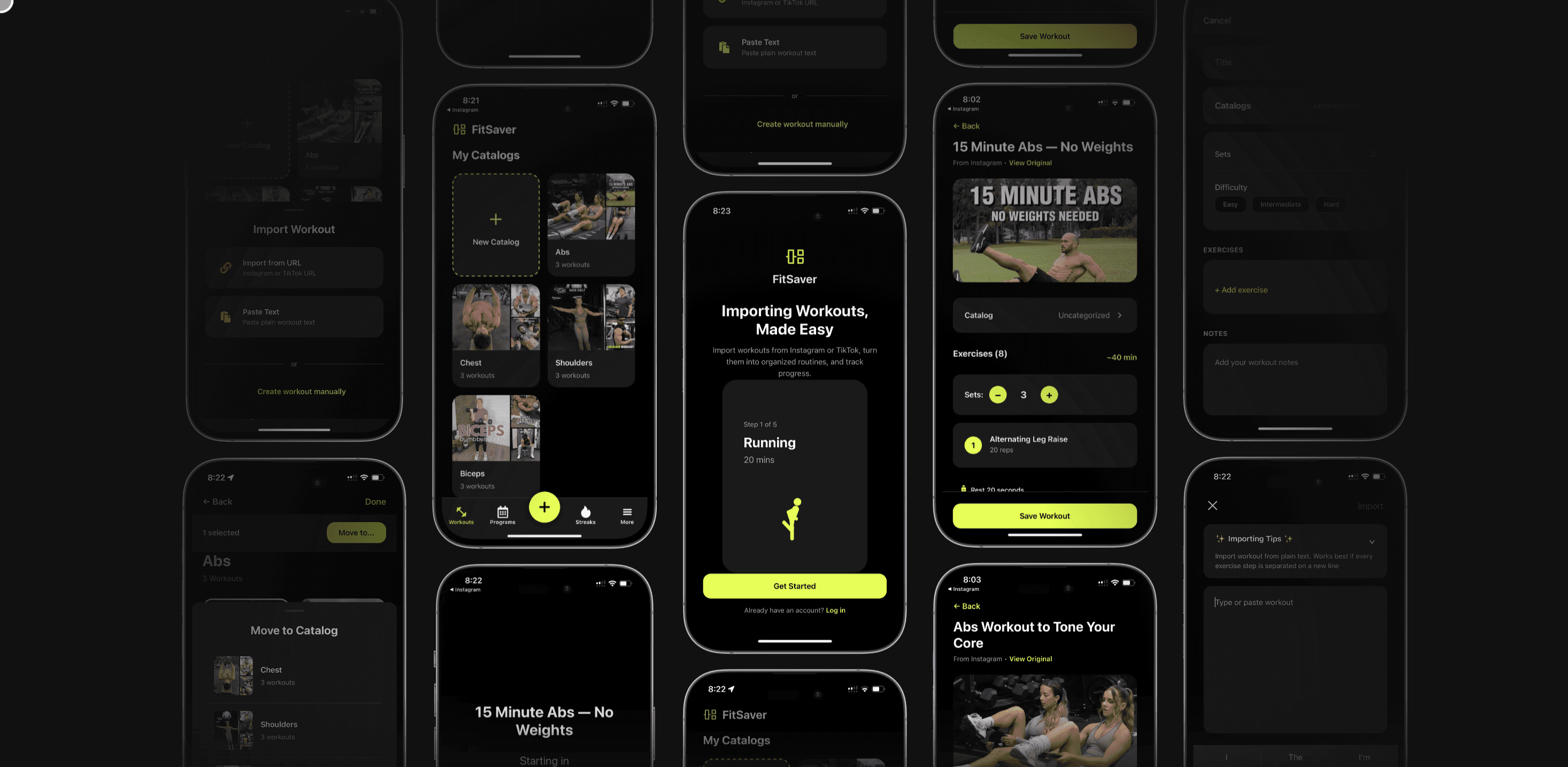
Importing saved content. Users can paste links or use share extensions from Instagram, TikTok, YouTube, and Facebook. FitSaver captures the clip, creator details, and caption metadata.
Automatic segmentation and tagging. Using a mix of metadata and manual quick-tagging, the app can suggest exercise names, muscle groups, equipment needed, and approximate durations.
Create a routine. A clip becomes an exercise card. Users assign sets, reps, rest intervals, tempo, and substitutions. Multiple clips can be combined into a single session.
One-screen workout mode. When training, users follow a single interface that shows the current exercise video, a countdown timer, rep cues, and the next move — no app-switching required.
Track and iterate. Post-workout, FitSaver logs performance — completed sets, weight used, notes — and uses that data for progression recommendations and streak tracking.
This pipeline transforms passive saves into active routines. The app’s design encourages use at the moment of need — at the gym, at home, or on the go.
Feature Breakdown: What Makes a Great Workout Organizer App
Not all workout organizers are created equal. FitSaver focuses on features that address the real drivers of behavior: clarity, speed, and feedback.
Collections and Programs
Collections let users group workouts by goal, equipment, or context: “Gym Strength,” “Quick Home AMRAP,” “Mobility Morning.” Programs string sessions into week-by-week plans with progressive overload or variation built in.
Timers and One-Screen Execution
FitSaver’s workout timer keeps everything in-view: current exercise video, remaining reps, rest countdown, and the upcoming exercise preview. No need to switch between apps or reset timers manually.
Progress Tracking and Streaks
Logging completion, weight, reps, and subjective difficulty creates a feedback loop. Streaks and milestones provide gamified motivation without gimmicks — simple, evidence-based nudges that foster consistency.
Attach Notes, Images, and Clips
Sometimes a workout needs context. Users can attach notes (“knees should track over toes”), photos of setup, or short video clips of their form for later review or coach feedback.
Adaptation and Equipment Filters
FitSaver recognizes equipment in saved clips and suggests substitutions (e.g., dumbbell goblet squat → kettlebell goblet or bodyweight Bulgarian split squat) so saved workouts stay useful in different environments.
Offline Mode and Creator Preservation
To avoid broken links, FitSaver can cache videos for offline use (subject to platform rules). If a clip is removed upstream, users still retain their curated exercise card.
Smart Search and Tags
Search by exercise, duration, intensity, or equipment. Tags transform a messy save folder into a searchable fitness library where “20-minute kettlebell full body” yields an actionable session.
Real-World Examples: How People Use FitSaver
Concrete scenarios show why this approach matters. The following examples reflect common user journeys FitSaver was designed for.
1. The College Student — Max (Age 20)
Max saves short TikTok strength supersets between classes. He often has 30–45 minutes at the campus gym. Using FitSaver, Max collects five saved clips into a “Campus Strength” collection, sets each exercise to 3 sets of 8–12 reps with 60 seconds rest, and adds weight suggestions adapted to the gym equipment. At workout time, he opens the session, hits Start, and follows the on-screen timer. No scrolling, no second-guessing — just training.
2. The New Parent — Sarah (Age 32)
Sarah’s free time is fragmented: 10–15 minute blocks between naps. She saved several Instagram home workouts that felt promising but were never shorter than 25 minutes. With FitSaver, she filters her saved clips for “under 15 minutes” and creates a micro-program: three 12-minute circuits tagged “baby nap.” The app suggests quick warm-up options and allows Sarah to attach a note reminding her to use diapers as a surface for incline push-ups. The result: real workouts that fit her schedule.
3. The Calisthenics Enthusiast — Leo (Age 27)
Leo uses YouTube tutorials for skill progressions — muscle-ups, front levers, planche. FitSaver lets him build a weekly plan with targeted progressions, video cues, and volume tracking. He logs attempts and uses the notes field to record set failure points. Seeing progression over weeks keeps him motivated and prevents plateaus.
4. The Mobility-Focused Trainer — Maya (Age 35)
Maya curates mobility flows from social creators and organizes them into routines for clients. She adds clinic-specific notes and shares a simplified follow-along session link so clients can use the one-screen timer without leaving the flow. FitSaver acts as her annotated video library and client delivery tool.
How to Organize Your Saved Workout Videos in 10 Minutes
Converting a chaotic save folder into a usable routine doesn’t need to be a weekend project. Here’s a quick start guide using FitSaver.
Import your top 20 saved clips. Use the share extension to send them to FitSaver. Focus on the ones you were most excited to try.
Create three collections. Label them by context: “Gym – Strength,” “Home – Quick,” “Mobility/Recovery.” Drag each clip into the most logical collection.
Tag each clip briefly. Add 1–3 tags: equipment, intensity, duration (e.g., “dumbbell,” “20 min,” “HIIT”).
Pick one session to build now. Combine 4–6 clips into a single session. Add reps/sets and rest times. If a clip lacks clarity, use the notes field.
Schedule it this week. Put the session on a calendar slot you’ll actually keep (e.g., Wednesday 6:30 a.m.).
Follow the session on the timer screen. No scrolling. Train. Log results. Celebrate the small win.
Ten minutes of organization can convert dozens of saves into immediate action and momentum.
Why One-Screen Workout Mode Is a Game-Changer
People underestimate how much friction leaves the gym early. Switching apps, searching a saved clip, and setting a timer are tiny interruptions that add up. FitSaver’s one-screen mode reduces those disruptions by keeping everything visible and actionable.
Fewer app switches = fewer distractions.
Clear cues keep form and tempo consistent.
Immediate logging preserves data and builds habit.
It’s the difference between “I’ll do it later” and “I did it now.”
Tracking Progress, Streaks, and Motivation
Organization solves the “what” problem; tracking solves the “did I improve?” problem. FitSaver turns workouts into data by capturing completion, reps, weight, perceived exertion, and notes. Over time, users can:
See trends: more reps at the same weight, lower RPE for the same volume, or improved form via attached videos.
Use streaks and milestones to build consistency without pressure.
Let the app suggest progression: add weight, increase reps, or swap for a harder variation after consistent success.
These small feedback loops are what sustain habits — not flashy badges, but meaningful evidence of improvement.
Using FitSaver for Different Training Styles
FitSaver isn’t just for traditional weight training. Its approach translates across modalities:
Gym Routine App Use
Combine multiple influencer clips into a cohesive gym session: warm-up, compound lifts, accessory circuits, and finisher. Add loading history so each week’s session picks up where the last left off.
Home Workout Planner
Filter for bodyweight or minimal-equipment clips, assemble circuits that fit small spaces, and schedule short sessions around other life demands.
Mobility and Rehab
Create progressive mobility sequences with notes about breathing and joint angles, and keep video references handy for proper cueing.
Calisthenics and Skill Work
Build skill ladders from tutorial clips and log attempts, progressing reps or hold times as skill improves.
HIIT and Cardio
Sequence short clips into interval sets with accurate work:rest timers. FitSaver’s timers ensure precise intervals without manual counting.
Privacy, Copyright, and Creator Respect
FitSaver emphasizes respectful use of creator content. The app typically links back to the original posts and stores user-curated annotations locally or in encrypted cloud storage. When videos are cached for offline use, FitSaver respects platform terms and gives users control over what’s downloaded.
Users are encouraged to credit creators if they share routines publicly and to avoid cropping or repurposing content in a way that misattributes instruction.
Integrations and Compatibility
FitSaver supports direct imports from Instagram, TikTok, YouTube, and Facebook via share extensions or link paste. It syncs with calendar apps for scheduling and can export workout summaries for coaches or personal records. Wearable integrations (e.g., heart rate tracking) enhance logging but aren’t required to get value from the app.
Pricing and Getting Started
FitSaver offers a free tier so users can start organizing and running basic sessions immediately. Paid tiers unlock advanced features such as unlimited cached videos, program creation tools, advanced progression suggestions, and coach-sharing capabilities. Prospective users can sign up, import a handful of saved clips, and have a usable routine in under 10 minutes.
The small time investment up front pays off the first time a user shows up and finishes a workout without wasting 15 minutes searching for “that saved one.”
Tips to Stop Scrolling at the Gym
Beyond using a fitness video organizer, some behavioral tips help reduce scrolling and maximize training time:
Pre-plan 24 hours ahead. Schedule your session in FitSaver the night before so you arrive with a clear plan.
Create a gym-only collection. Keep a dedicated collection for gym sessions so you don’t get distracted by home workouts when you’re in the weight room.
Set micro-goals. Commit to one lift or circuit; once that’s done, momentum often carries the rest.
Use the one-screen timer. Follow the session in FitSaver rather than hopping to TikTok for “motivation.”
Limit decision points. Reduce choices by setting reps and rest in advance and sticking to them.
Why This Matters for Busy People
For the app’s target audience — 18–35-year-old social-media-savvy fitness enthusiasts — time is the scarcest resource. The friction of choosing, organizing, and executing workouts often defeats motivation. By converting saved content into actionable routines and giving users one place to plan, execute, and track, FitSaver reduces friction, rescues lost inspiration, and turns saved videos into measurable progress.
Conclusion
Saved workout videos are a modern-day problem: inspiration without a plan. That mismatch is why so many fitness fans "save" workouts they never do. Fitness Video Organizer 2026: Stop Scrolling, Find Any Workout Fast describes a practical alternative. FitSaver takes the social media fragments people collect and makes them useful — organizing content into collections and programs, adding timers and progression, and letting users follow workouts on a single screen.
For anyone tired of scrolling at the gym, forgetting the next exercise in a saved clip, or losing motivation because their training library is a mess, FitSaver offers a clear path: import, organize, plan, and train. The first small step is free — import a few of those saves tonight and schedule a session for tomorrow. It’s the simplest way to turn social inspiration into measurable results.
Frequently Asked Questions
How does FitSaver import saved workout videos from platforms like Instagram or TikTok?
FitSaver uses share extensions and link-paste functionality. When a user shares a video from Instagram, TikTok, YouTube, or Facebook to FitSaver, the app captures the clip’s URL and metadata and creates an exercise card. Depending on platform rules, FitSaver can cache the video for offline playback or keep a link to the original.
Can FitSaver automatically identify exercises in a video?
FitSaver suggests exercise names and tags based on metadata and AI-assisted analysis, but users can edit tags and descriptions. This hybrid approach balances automation with human clarity and ensures the library remains accurate for the user’s needs.
Will FitSaver help me progress on lifts or skills?
Yes. By tracking weights, reps, and subjective difficulty, FitSaver can recommend small progression steps. Users can build multi-week programs and let the app suggest when to increase load or reps based on logged performance.
Is it possible to use FitSaver without saving videos from social apps?
Absolutely. FitSaver works with uploaded videos, in-app recorded clips, and public links in addition to saved social media content. It functions equally well as a standalone workout planner and tracker.
What if a creator removes a video after I save it?
If the video is cached in FitSaver (in line with platform rules), the user will retain access. If it wasn’t cached, FitSaver preserves the exercise card and notes so the user can replace the clip with an alternative or keep the cues and rep scheme for later.
Ready to stop saving workouts and start finishing them? Try FitSaver to turn saved videos into actual training plans — organized, timed, and trackable so inspiration becomes progress.
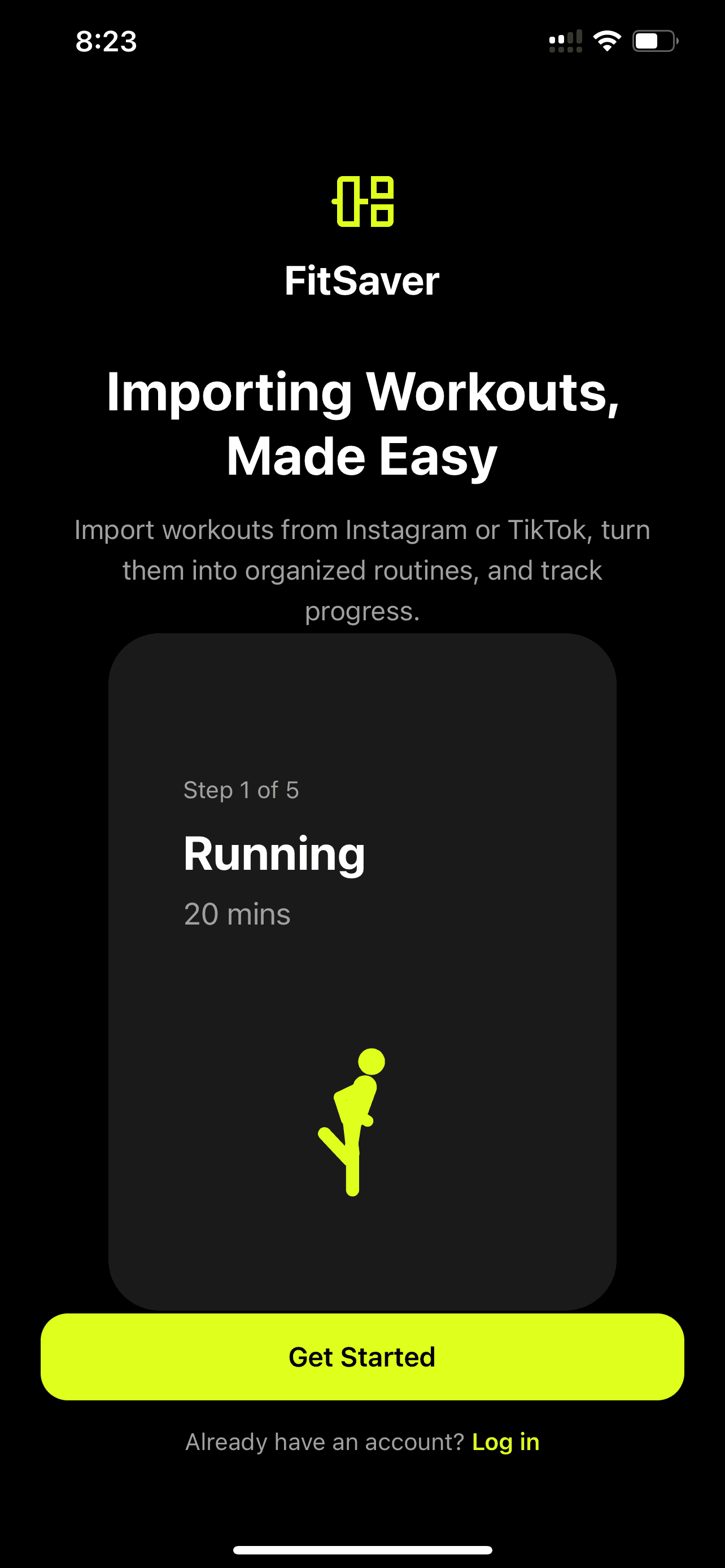

There’s a familiar screen many fitness fans wake up to: a growing folder of saved clips from Instagram, TikTok, YouTube, and Facebook that promised inspiration — but now only creates chaos. Fitness Video Organizer 2026: Stop Scrolling, Find Any Workout Fast is about solving that exact pain. This article explains why saved workout videos turn into clutter, why people rarely follow them, and how FitSaver — a workout organizer app — converts short social clips into practical, followable routines so users can plan and train without distraction.
Why Saved Workout Videos Become Chaos
Saving a workout video feels productive. It’s a digital bookmark: “I’ll try this later.” But over time those bookmarks multiply. Several factors turn a once-useful collection into a maze.
No context or structure. A saved video rarely includes the creator’s full set structure, progressions, warm-up or cool-down. It's one clip in isolation.
Mixed modalities. Saved content blends mobility flows, HIIT, strength supersets, and dance cardio into a single list, so finding a gym-ready strength session becomes a needle-in-a-haystack hunt.
Duplicate and orphaned saves. The same move gets saved multiple times by different creators. Others are partial clips or trailer-like teasers that aren’t actionable.
No sequencing or pacing. Clips don’t tell you rest times, rep schemes, or how they fit into a weekly plan — all critical to consistent progress.
The attention economy. Social platforms are optimized to keep users scrolling, not training. Saved content sits in an environment designed for consumption, not execution.
Put together, these issues mean saved videos become a convenience debt: something that once felt like future help becomes a procrastination trigger.
The Problem With Instagram and TikTok Save Folders
Most people use platform-native save features because they’re easy. But those features were never designed to be a workout planner.
Flat lists without metadata. Save folders show thumbnails and captions, but they don’t capture tempo, required equipment, or target muscle groups.
Searching is weak. Keyword search usually matches captions but not content inside the video. Want a “10-minute kettlebell complex”? Good luck.
No in-session support. Saved videos don’t provide timers, rest prompts, or rep counters. Users must jump back to the app, find the clip, then switch to a timer — a recipe for distraction.
Platform lock-in. If content is removed or the creator unlists a video, the saved link may break. Users lose access to workouts they planned to try.
Fragmented cross-platform saves. People save across TikTok, Instagram, YouTube, and Facebook; there’s no single dashboard to manage all of it.
These constraints explain why “save workout videos” often means “save and forget.”
Why People Fail to Follow Saved Workouts
Understanding the psychology behind saved-but-unused workouts helps explain why a technical solution matters as much as an organizational one.
Decision fatigue. At the gym or at home, choosing a workout from dozens of saves requires willpower. People often default to “scrolling” or quitting because choice feels like work.
Missing micro-instructions. Creators often assume viewers know exercise variations, scaling options, or tempo. Without explicit cues, users freeze mid-set or skip the workout.
Time mismatch. A saved 30-minute HIIT might be ideal, but if the user only has 20 minutes, they won’t adapt. The absence of quick alternatives makes the saved workout impractical.
Context misalignment. A gym-based workout saved at home, or vice versa, causes friction. Users then abandon the idea rather than modify it.
No accountability loop. Saved videos don’t log completion, so there’s zero feedback or momentum built from consistency.
Those challenges are behavioral as much as technical — which is why a successful fitness video organizer must tackle both.
Introducing the Solution: FitSaver — Fitness Video Organizer 2026
FitSaver was created to bridge the gap between inspiration and action. The app imports saved workout videos from social platforms and turns them into structured, trackable routines that can be followed without leaving the timer screen. For users who constantly save workout videos and then never do them, FitSaver offers a path from chaos to consistency.
“People were collecting workouts like postcards,” says FitSaver’s founder. “We made a way to turn that collection into an actual training library.”
FitSaver keeps the social discovery moment — the thrill of finding a new move — while removing the friction that prevents it from becoming a completed session. The result is a workout planner that works with the way people actually use content, not against it.
How FitSaver Converts Chaotic Clips Into Structured Routines
At its core, FitSaver performs three jobs well: import, organize, and execute. Here’s how that workflow typically looks.
Importing saved content. Users can paste links or use share extensions from Instagram, TikTok, YouTube, and Facebook. FitSaver captures the clip, creator details, and caption metadata.
Automatic segmentation and tagging. Using a mix of metadata and manual quick-tagging, the app can suggest exercise names, muscle groups, equipment needed, and approximate durations.
Create a routine. A clip becomes an exercise card. Users assign sets, reps, rest intervals, tempo, and substitutions. Multiple clips can be combined into a single session.
One-screen workout mode. When training, users follow a single interface that shows the current exercise video, a countdown timer, rep cues, and the next move — no app-switching required.
Track and iterate. Post-workout, FitSaver logs performance — completed sets, weight used, notes — and uses that data for progression recommendations and streak tracking.
This pipeline transforms passive saves into active routines. The app’s design encourages use at the moment of need — at the gym, at home, or on the go.
Feature Breakdown: What Makes a Great Workout Organizer App
Not all workout organizers are created equal. FitSaver focuses on features that address the real drivers of behavior: clarity, speed, and feedback.
Collections and Programs
Collections let users group workouts by goal, equipment, or context: “Gym Strength,” “Quick Home AMRAP,” “Mobility Morning.” Programs string sessions into week-by-week plans with progressive overload or variation built in.
Timers and One-Screen Execution
FitSaver’s workout timer keeps everything in-view: current exercise video, remaining reps, rest countdown, and the upcoming exercise preview. No need to switch between apps or reset timers manually.
Progress Tracking and Streaks
Logging completion, weight, reps, and subjective difficulty creates a feedback loop. Streaks and milestones provide gamified motivation without gimmicks — simple, evidence-based nudges that foster consistency.
Attach Notes, Images, and Clips
Sometimes a workout needs context. Users can attach notes (“knees should track over toes”), photos of setup, or short video clips of their form for later review or coach feedback.
Adaptation and Equipment Filters
FitSaver recognizes equipment in saved clips and suggests substitutions (e.g., dumbbell goblet squat → kettlebell goblet or bodyweight Bulgarian split squat) so saved workouts stay useful in different environments.
Offline Mode and Creator Preservation
To avoid broken links, FitSaver can cache videos for offline use (subject to platform rules). If a clip is removed upstream, users still retain their curated exercise card.
Smart Search and Tags
Search by exercise, duration, intensity, or equipment. Tags transform a messy save folder into a searchable fitness library where “20-minute kettlebell full body” yields an actionable session.
Real-World Examples: How People Use FitSaver
Concrete scenarios show why this approach matters. The following examples reflect common user journeys FitSaver was designed for.
1. The College Student — Max (Age 20)
Max saves short TikTok strength supersets between classes. He often has 30–45 minutes at the campus gym. Using FitSaver, Max collects five saved clips into a “Campus Strength” collection, sets each exercise to 3 sets of 8–12 reps with 60 seconds rest, and adds weight suggestions adapted to the gym equipment. At workout time, he opens the session, hits Start, and follows the on-screen timer. No scrolling, no second-guessing — just training.
2. The New Parent — Sarah (Age 32)
Sarah’s free time is fragmented: 10–15 minute blocks between naps. She saved several Instagram home workouts that felt promising but were never shorter than 25 minutes. With FitSaver, she filters her saved clips for “under 15 minutes” and creates a micro-program: three 12-minute circuits tagged “baby nap.” The app suggests quick warm-up options and allows Sarah to attach a note reminding her to use diapers as a surface for incline push-ups. The result: real workouts that fit her schedule.
3. The Calisthenics Enthusiast — Leo (Age 27)
Leo uses YouTube tutorials for skill progressions — muscle-ups, front levers, planche. FitSaver lets him build a weekly plan with targeted progressions, video cues, and volume tracking. He logs attempts and uses the notes field to record set failure points. Seeing progression over weeks keeps him motivated and prevents plateaus.
4. The Mobility-Focused Trainer — Maya (Age 35)
Maya curates mobility flows from social creators and organizes them into routines for clients. She adds clinic-specific notes and shares a simplified follow-along session link so clients can use the one-screen timer without leaving the flow. FitSaver acts as her annotated video library and client delivery tool.
How to Organize Your Saved Workout Videos in 10 Minutes
Converting a chaotic save folder into a usable routine doesn’t need to be a weekend project. Here’s a quick start guide using FitSaver.
Import your top 20 saved clips. Use the share extension to send them to FitSaver. Focus on the ones you were most excited to try.
Create three collections. Label them by context: “Gym – Strength,” “Home – Quick,” “Mobility/Recovery.” Drag each clip into the most logical collection.
Tag each clip briefly. Add 1–3 tags: equipment, intensity, duration (e.g., “dumbbell,” “20 min,” “HIIT”).
Pick one session to build now. Combine 4–6 clips into a single session. Add reps/sets and rest times. If a clip lacks clarity, use the notes field.
Schedule it this week. Put the session on a calendar slot you’ll actually keep (e.g., Wednesday 6:30 a.m.).
Follow the session on the timer screen. No scrolling. Train. Log results. Celebrate the small win.
Ten minutes of organization can convert dozens of saves into immediate action and momentum.
Why One-Screen Workout Mode Is a Game-Changer
People underestimate how much friction leaves the gym early. Switching apps, searching a saved clip, and setting a timer are tiny interruptions that add up. FitSaver’s one-screen mode reduces those disruptions by keeping everything visible and actionable.
Fewer app switches = fewer distractions.
Clear cues keep form and tempo consistent.
Immediate logging preserves data and builds habit.
It’s the difference between “I’ll do it later” and “I did it now.”
Tracking Progress, Streaks, and Motivation
Organization solves the “what” problem; tracking solves the “did I improve?” problem. FitSaver turns workouts into data by capturing completion, reps, weight, perceived exertion, and notes. Over time, users can:
See trends: more reps at the same weight, lower RPE for the same volume, or improved form via attached videos.
Use streaks and milestones to build consistency without pressure.
Let the app suggest progression: add weight, increase reps, or swap for a harder variation after consistent success.
These small feedback loops are what sustain habits — not flashy badges, but meaningful evidence of improvement.
Using FitSaver for Different Training Styles
FitSaver isn’t just for traditional weight training. Its approach translates across modalities:
Gym Routine App Use
Combine multiple influencer clips into a cohesive gym session: warm-up, compound lifts, accessory circuits, and finisher. Add loading history so each week’s session picks up where the last left off.
Home Workout Planner
Filter for bodyweight or minimal-equipment clips, assemble circuits that fit small spaces, and schedule short sessions around other life demands.
Mobility and Rehab
Create progressive mobility sequences with notes about breathing and joint angles, and keep video references handy for proper cueing.
Calisthenics and Skill Work
Build skill ladders from tutorial clips and log attempts, progressing reps or hold times as skill improves.
HIIT and Cardio
Sequence short clips into interval sets with accurate work:rest timers. FitSaver’s timers ensure precise intervals without manual counting.
Privacy, Copyright, and Creator Respect
FitSaver emphasizes respectful use of creator content. The app typically links back to the original posts and stores user-curated annotations locally or in encrypted cloud storage. When videos are cached for offline use, FitSaver respects platform terms and gives users control over what’s downloaded.
Users are encouraged to credit creators if they share routines publicly and to avoid cropping or repurposing content in a way that misattributes instruction.
Integrations and Compatibility
FitSaver supports direct imports from Instagram, TikTok, YouTube, and Facebook via share extensions or link paste. It syncs with calendar apps for scheduling and can export workout summaries for coaches or personal records. Wearable integrations (e.g., heart rate tracking) enhance logging but aren’t required to get value from the app.
Pricing and Getting Started
FitSaver offers a free tier so users can start organizing and running basic sessions immediately. Paid tiers unlock advanced features such as unlimited cached videos, program creation tools, advanced progression suggestions, and coach-sharing capabilities. Prospective users can sign up, import a handful of saved clips, and have a usable routine in under 10 minutes.
The small time investment up front pays off the first time a user shows up and finishes a workout without wasting 15 minutes searching for “that saved one.”
Tips to Stop Scrolling at the Gym
Beyond using a fitness video organizer, some behavioral tips help reduce scrolling and maximize training time:
Pre-plan 24 hours ahead. Schedule your session in FitSaver the night before so you arrive with a clear plan.
Create a gym-only collection. Keep a dedicated collection for gym sessions so you don’t get distracted by home workouts when you’re in the weight room.
Set micro-goals. Commit to one lift or circuit; once that’s done, momentum often carries the rest.
Use the one-screen timer. Follow the session in FitSaver rather than hopping to TikTok for “motivation.”
Limit decision points. Reduce choices by setting reps and rest in advance and sticking to them.
Why This Matters for Busy People
For the app’s target audience — 18–35-year-old social-media-savvy fitness enthusiasts — time is the scarcest resource. The friction of choosing, organizing, and executing workouts often defeats motivation. By converting saved content into actionable routines and giving users one place to plan, execute, and track, FitSaver reduces friction, rescues lost inspiration, and turns saved videos into measurable progress.
Conclusion
Saved workout videos are a modern-day problem: inspiration without a plan. That mismatch is why so many fitness fans "save" workouts they never do. Fitness Video Organizer 2026: Stop Scrolling, Find Any Workout Fast describes a practical alternative. FitSaver takes the social media fragments people collect and makes them useful — organizing content into collections and programs, adding timers and progression, and letting users follow workouts on a single screen.
For anyone tired of scrolling at the gym, forgetting the next exercise in a saved clip, or losing motivation because their training library is a mess, FitSaver offers a clear path: import, organize, plan, and train. The first small step is free — import a few of those saves tonight and schedule a session for tomorrow. It’s the simplest way to turn social inspiration into measurable results.
Frequently Asked Questions
How does FitSaver import saved workout videos from platforms like Instagram or TikTok?
FitSaver uses share extensions and link-paste functionality. When a user shares a video from Instagram, TikTok, YouTube, or Facebook to FitSaver, the app captures the clip’s URL and metadata and creates an exercise card. Depending on platform rules, FitSaver can cache the video for offline playback or keep a link to the original.
Can FitSaver automatically identify exercises in a video?
FitSaver suggests exercise names and tags based on metadata and AI-assisted analysis, but users can edit tags and descriptions. This hybrid approach balances automation with human clarity and ensures the library remains accurate for the user’s needs.
Will FitSaver help me progress on lifts or skills?
Yes. By tracking weights, reps, and subjective difficulty, FitSaver can recommend small progression steps. Users can build multi-week programs and let the app suggest when to increase load or reps based on logged performance.
Is it possible to use FitSaver without saving videos from social apps?
Absolutely. FitSaver works with uploaded videos, in-app recorded clips, and public links in addition to saved social media content. It functions equally well as a standalone workout planner and tracker.
What if a creator removes a video after I save it?
If the video is cached in FitSaver (in line with platform rules), the user will retain access. If it wasn’t cached, FitSaver preserves the exercise card and notes so the user can replace the clip with an alternative or keep the cues and rep scheme for later.
Ready to stop saving workouts and start finishing them? Try FitSaver to turn saved videos into actual training plans — organized, timed, and trackable so inspiration becomes progress.
There’s a familiar screen many fitness fans wake up to: a growing folder of saved clips from Instagram, TikTok, YouTube, and Facebook that promised inspiration — but now only creates chaos. Fitness Video Organizer 2026: Stop Scrolling, Find Any Workout Fast is about solving that exact pain. This article explains why saved workout videos turn into clutter, why people rarely follow them, and how FitSaver — a workout organizer app — converts short social clips into practical, followable routines so users can plan and train without distraction.
Why Saved Workout Videos Become Chaos
Saving a workout video feels productive. It’s a digital bookmark: “I’ll try this later.” But over time those bookmarks multiply. Several factors turn a once-useful collection into a maze.
No context or structure. A saved video rarely includes the creator’s full set structure, progressions, warm-up or cool-down. It's one clip in isolation.
Mixed modalities. Saved content blends mobility flows, HIIT, strength supersets, and dance cardio into a single list, so finding a gym-ready strength session becomes a needle-in-a-haystack hunt.
Duplicate and orphaned saves. The same move gets saved multiple times by different creators. Others are partial clips or trailer-like teasers that aren’t actionable.
No sequencing or pacing. Clips don’t tell you rest times, rep schemes, or how they fit into a weekly plan — all critical to consistent progress.
The attention economy. Social platforms are optimized to keep users scrolling, not training. Saved content sits in an environment designed for consumption, not execution.
Put together, these issues mean saved videos become a convenience debt: something that once felt like future help becomes a procrastination trigger.
The Problem With Instagram and TikTok Save Folders
Most people use platform-native save features because they’re easy. But those features were never designed to be a workout planner.
Flat lists without metadata. Save folders show thumbnails and captions, but they don’t capture tempo, required equipment, or target muscle groups.
Searching is weak. Keyword search usually matches captions but not content inside the video. Want a “10-minute kettlebell complex”? Good luck.
No in-session support. Saved videos don’t provide timers, rest prompts, or rep counters. Users must jump back to the app, find the clip, then switch to a timer — a recipe for distraction.
Platform lock-in. If content is removed or the creator unlists a video, the saved link may break. Users lose access to workouts they planned to try.
Fragmented cross-platform saves. People save across TikTok, Instagram, YouTube, and Facebook; there’s no single dashboard to manage all of it.
These constraints explain why “save workout videos” often means “save and forget.”
Why People Fail to Follow Saved Workouts
Understanding the psychology behind saved-but-unused workouts helps explain why a technical solution matters as much as an organizational one.
Decision fatigue. At the gym or at home, choosing a workout from dozens of saves requires willpower. People often default to “scrolling” or quitting because choice feels like work.
Missing micro-instructions. Creators often assume viewers know exercise variations, scaling options, or tempo. Without explicit cues, users freeze mid-set or skip the workout.
Time mismatch. A saved 30-minute HIIT might be ideal, but if the user only has 20 minutes, they won’t adapt. The absence of quick alternatives makes the saved workout impractical.
Context misalignment. A gym-based workout saved at home, or vice versa, causes friction. Users then abandon the idea rather than modify it.
No accountability loop. Saved videos don’t log completion, so there’s zero feedback or momentum built from consistency.
Those challenges are behavioral as much as technical — which is why a successful fitness video organizer must tackle both.
Introducing the Solution: FitSaver — Fitness Video Organizer 2026
FitSaver was created to bridge the gap between inspiration and action. The app imports saved workout videos from social platforms and turns them into structured, trackable routines that can be followed without leaving the timer screen. For users who constantly save workout videos and then never do them, FitSaver offers a path from chaos to consistency.
“People were collecting workouts like postcards,” says FitSaver’s founder. “We made a way to turn that collection into an actual training library.”
FitSaver keeps the social discovery moment — the thrill of finding a new move — while removing the friction that prevents it from becoming a completed session. The result is a workout planner that works with the way people actually use content, not against it.
How FitSaver Converts Chaotic Clips Into Structured Routines
At its core, FitSaver performs three jobs well: import, organize, and execute. Here’s how that workflow typically looks.
Importing saved content. Users can paste links or use share extensions from Instagram, TikTok, YouTube, and Facebook. FitSaver captures the clip, creator details, and caption metadata.
Automatic segmentation and tagging. Using a mix of metadata and manual quick-tagging, the app can suggest exercise names, muscle groups, equipment needed, and approximate durations.
Create a routine. A clip becomes an exercise card. Users assign sets, reps, rest intervals, tempo, and substitutions. Multiple clips can be combined into a single session.
One-screen workout mode. When training, users follow a single interface that shows the current exercise video, a countdown timer, rep cues, and the next move — no app-switching required.
Track and iterate. Post-workout, FitSaver logs performance — completed sets, weight used, notes — and uses that data for progression recommendations and streak tracking.
This pipeline transforms passive saves into active routines. The app’s design encourages use at the moment of need — at the gym, at home, or on the go.
Feature Breakdown: What Makes a Great Workout Organizer App
Not all workout organizers are created equal. FitSaver focuses on features that address the real drivers of behavior: clarity, speed, and feedback.
Collections and Programs
Collections let users group workouts by goal, equipment, or context: “Gym Strength,” “Quick Home AMRAP,” “Mobility Morning.” Programs string sessions into week-by-week plans with progressive overload or variation built in.
Timers and One-Screen Execution
FitSaver’s workout timer keeps everything in-view: current exercise video, remaining reps, rest countdown, and the upcoming exercise preview. No need to switch between apps or reset timers manually.
Progress Tracking and Streaks
Logging completion, weight, reps, and subjective difficulty creates a feedback loop. Streaks and milestones provide gamified motivation without gimmicks — simple, evidence-based nudges that foster consistency.
Attach Notes, Images, and Clips
Sometimes a workout needs context. Users can attach notes (“knees should track over toes”), photos of setup, or short video clips of their form for later review or coach feedback.
Adaptation and Equipment Filters
FitSaver recognizes equipment in saved clips and suggests substitutions (e.g., dumbbell goblet squat → kettlebell goblet or bodyweight Bulgarian split squat) so saved workouts stay useful in different environments.
Offline Mode and Creator Preservation
To avoid broken links, FitSaver can cache videos for offline use (subject to platform rules). If a clip is removed upstream, users still retain their curated exercise card.
Smart Search and Tags
Search by exercise, duration, intensity, or equipment. Tags transform a messy save folder into a searchable fitness library where “20-minute kettlebell full body” yields an actionable session.
Real-World Examples: How People Use FitSaver
Concrete scenarios show why this approach matters. The following examples reflect common user journeys FitSaver was designed for.
1. The College Student — Max (Age 20)
Max saves short TikTok strength supersets between classes. He often has 30–45 minutes at the campus gym. Using FitSaver, Max collects five saved clips into a “Campus Strength” collection, sets each exercise to 3 sets of 8–12 reps with 60 seconds rest, and adds weight suggestions adapted to the gym equipment. At workout time, he opens the session, hits Start, and follows the on-screen timer. No scrolling, no second-guessing — just training.
2. The New Parent — Sarah (Age 32)
Sarah’s free time is fragmented: 10–15 minute blocks between naps. She saved several Instagram home workouts that felt promising but were never shorter than 25 minutes. With FitSaver, she filters her saved clips for “under 15 minutes” and creates a micro-program: three 12-minute circuits tagged “baby nap.” The app suggests quick warm-up options and allows Sarah to attach a note reminding her to use diapers as a surface for incline push-ups. The result: real workouts that fit her schedule.
3. The Calisthenics Enthusiast — Leo (Age 27)
Leo uses YouTube tutorials for skill progressions — muscle-ups, front levers, planche. FitSaver lets him build a weekly plan with targeted progressions, video cues, and volume tracking. He logs attempts and uses the notes field to record set failure points. Seeing progression over weeks keeps him motivated and prevents plateaus.
4. The Mobility-Focused Trainer — Maya (Age 35)
Maya curates mobility flows from social creators and organizes them into routines for clients. She adds clinic-specific notes and shares a simplified follow-along session link so clients can use the one-screen timer without leaving the flow. FitSaver acts as her annotated video library and client delivery tool.
How to Organize Your Saved Workout Videos in 10 Minutes
Converting a chaotic save folder into a usable routine doesn’t need to be a weekend project. Here’s a quick start guide using FitSaver.
Import your top 20 saved clips. Use the share extension to send them to FitSaver. Focus on the ones you were most excited to try.
Create three collections. Label them by context: “Gym – Strength,” “Home – Quick,” “Mobility/Recovery.” Drag each clip into the most logical collection.
Tag each clip briefly. Add 1–3 tags: equipment, intensity, duration (e.g., “dumbbell,” “20 min,” “HIIT”).
Pick one session to build now. Combine 4–6 clips into a single session. Add reps/sets and rest times. If a clip lacks clarity, use the notes field.
Schedule it this week. Put the session on a calendar slot you’ll actually keep (e.g., Wednesday 6:30 a.m.).
Follow the session on the timer screen. No scrolling. Train. Log results. Celebrate the small win.
Ten minutes of organization can convert dozens of saves into immediate action and momentum.
Why One-Screen Workout Mode Is a Game-Changer
People underestimate how much friction leaves the gym early. Switching apps, searching a saved clip, and setting a timer are tiny interruptions that add up. FitSaver’s one-screen mode reduces those disruptions by keeping everything visible and actionable.
Fewer app switches = fewer distractions.
Clear cues keep form and tempo consistent.
Immediate logging preserves data and builds habit.
It’s the difference between “I’ll do it later” and “I did it now.”
Tracking Progress, Streaks, and Motivation
Organization solves the “what” problem; tracking solves the “did I improve?” problem. FitSaver turns workouts into data by capturing completion, reps, weight, perceived exertion, and notes. Over time, users can:
See trends: more reps at the same weight, lower RPE for the same volume, or improved form via attached videos.
Use streaks and milestones to build consistency without pressure.
Let the app suggest progression: add weight, increase reps, or swap for a harder variation after consistent success.
These small feedback loops are what sustain habits — not flashy badges, but meaningful evidence of improvement.
Using FitSaver for Different Training Styles
FitSaver isn’t just for traditional weight training. Its approach translates across modalities:
Gym Routine App Use
Combine multiple influencer clips into a cohesive gym session: warm-up, compound lifts, accessory circuits, and finisher. Add loading history so each week’s session picks up where the last left off.
Home Workout Planner
Filter for bodyweight or minimal-equipment clips, assemble circuits that fit small spaces, and schedule short sessions around other life demands.
Mobility and Rehab
Create progressive mobility sequences with notes about breathing and joint angles, and keep video references handy for proper cueing.
Calisthenics and Skill Work
Build skill ladders from tutorial clips and log attempts, progressing reps or hold times as skill improves.
HIIT and Cardio
Sequence short clips into interval sets with accurate work:rest timers. FitSaver’s timers ensure precise intervals without manual counting.
Privacy, Copyright, and Creator Respect
FitSaver emphasizes respectful use of creator content. The app typically links back to the original posts and stores user-curated annotations locally or in encrypted cloud storage. When videos are cached for offline use, FitSaver respects platform terms and gives users control over what’s downloaded.
Users are encouraged to credit creators if they share routines publicly and to avoid cropping or repurposing content in a way that misattributes instruction.
Integrations and Compatibility
FitSaver supports direct imports from Instagram, TikTok, YouTube, and Facebook via share extensions or link paste. It syncs with calendar apps for scheduling and can export workout summaries for coaches or personal records. Wearable integrations (e.g., heart rate tracking) enhance logging but aren’t required to get value from the app.
Pricing and Getting Started
FitSaver offers a free tier so users can start organizing and running basic sessions immediately. Paid tiers unlock advanced features such as unlimited cached videos, program creation tools, advanced progression suggestions, and coach-sharing capabilities. Prospective users can sign up, import a handful of saved clips, and have a usable routine in under 10 minutes.
The small time investment up front pays off the first time a user shows up and finishes a workout without wasting 15 minutes searching for “that saved one.”
Tips to Stop Scrolling at the Gym
Beyond using a fitness video organizer, some behavioral tips help reduce scrolling and maximize training time:
Pre-plan 24 hours ahead. Schedule your session in FitSaver the night before so you arrive with a clear plan.
Create a gym-only collection. Keep a dedicated collection for gym sessions so you don’t get distracted by home workouts when you’re in the weight room.
Set micro-goals. Commit to one lift or circuit; once that’s done, momentum often carries the rest.
Use the one-screen timer. Follow the session in FitSaver rather than hopping to TikTok for “motivation.”
Limit decision points. Reduce choices by setting reps and rest in advance and sticking to them.
Why This Matters for Busy People
For the app’s target audience — 18–35-year-old social-media-savvy fitness enthusiasts — time is the scarcest resource. The friction of choosing, organizing, and executing workouts often defeats motivation. By converting saved content into actionable routines and giving users one place to plan, execute, and track, FitSaver reduces friction, rescues lost inspiration, and turns saved videos into measurable progress.
Conclusion
Saved workout videos are a modern-day problem: inspiration without a plan. That mismatch is why so many fitness fans "save" workouts they never do. Fitness Video Organizer 2026: Stop Scrolling, Find Any Workout Fast describes a practical alternative. FitSaver takes the social media fragments people collect and makes them useful — organizing content into collections and programs, adding timers and progression, and letting users follow workouts on a single screen.
For anyone tired of scrolling at the gym, forgetting the next exercise in a saved clip, or losing motivation because their training library is a mess, FitSaver offers a clear path: import, organize, plan, and train. The first small step is free — import a few of those saves tonight and schedule a session for tomorrow. It’s the simplest way to turn social inspiration into measurable results.
Frequently Asked Questions
How does FitSaver import saved workout videos from platforms like Instagram or TikTok?
FitSaver uses share extensions and link-paste functionality. When a user shares a video from Instagram, TikTok, YouTube, or Facebook to FitSaver, the app captures the clip’s URL and metadata and creates an exercise card. Depending on platform rules, FitSaver can cache the video for offline playback or keep a link to the original.
Can FitSaver automatically identify exercises in a video?
FitSaver suggests exercise names and tags based on metadata and AI-assisted analysis, but users can edit tags and descriptions. This hybrid approach balances automation with human clarity and ensures the library remains accurate for the user’s needs.
Will FitSaver help me progress on lifts or skills?
Yes. By tracking weights, reps, and subjective difficulty, FitSaver can recommend small progression steps. Users can build multi-week programs and let the app suggest when to increase load or reps based on logged performance.
Is it possible to use FitSaver without saving videos from social apps?
Absolutely. FitSaver works with uploaded videos, in-app recorded clips, and public links in addition to saved social media content. It functions equally well as a standalone workout planner and tracker.
What if a creator removes a video after I save it?
If the video is cached in FitSaver (in line with platform rules), the user will retain access. If it wasn’t cached, FitSaver preserves the exercise card and notes so the user can replace the clip with an alternative or keep the cues and rep scheme for later.
Ready to stop saving workouts and start finishing them? Try FitSaver to turn saved videos into actual training plans — organized, timed, and trackable so inspiration becomes progress.