May 10, 2026
Workout Video Organizer: How to Turn Saved Clips Into Structured Routines
May 10, 2026
Workout Video Organizer: How to Turn Saved Clips Into Structured Routines
May 10, 2026
Workout Video Organizer: How to Turn Saved Clips Into Structured Routines
By the time Maya hit "save" on her tenth Instagram HIIT clip, her phone had become a digital shoebox of workouts — great moves, zero structure. A reliable workout video organizer changes that chaos into a clear plan, turning scattered TikTok and Instagram videos into a focused training session that fits into a busy week.
Why Organizing Workout Videos Matters
Fitness enthusiasts often collect short-form videos because they inspire new moves or fresh training styles. But inspiration rarely becomes progress by accident. When saved videos pile up without context, people lose track of what worked, how to progress, or which exercises match their goals. A workout video organizer solves three core problems:
Time wasted: Scrolling through dozens of clips eats time and focus.
Inconsistent training: Random workouts don't build consistent progress or apply principles like progressive overload.
Lost context: Videos often lack set/rep guidance, equipment notes, or modifications.
Organizing videos into routines gives structure, saves time, and makes it easy to measure progress — essential for anyone who wants results rather than scattered inspiration.
What Is a Workout Video Organizer?
A workout video organizer is a tool — usually an app or software feature — that helps users catalog, tag, arrange, and convert short-form workout clips into complete training sessions. Instead of a random list of saved posts, users get playlists or routines with ordered exercises, set/rep suggestions, rest intervals, warm-ups, and progress tracking.
At its simplest, a workout video organizer does three things:
Imports or links workout videos from platforms like Instagram and TikTok.
Lets users tag, sort, and group videos by muscle group, equipment, difficulty, or goal.
Builds structured sequences (routines) that can be scheduled, tracked, and repeated.
Core Features to Look For
Not every organizer is created equal. An effective workout video organizer should include these features to be genuinely useful:
Direct import or smart link: Ability to add videos from Instagram, TikTok, YouTube, or local storage without complex downloads.
Tagging and metadata: Custom tags for muscle group, intensity, equipment, duration, and goal.
Routine builder: Drag-and-drop interface to assemble videos into ordered workouts with sets, reps, and rest times.
Calendar and scheduling: Plan when to perform routines and see weekly volume at a glance.
Progress tracking: Log sets, weights, progress photos, and notes to track improvements.
Offline access: Ability to view routines and videos without cell service.
Substitutions and alternatives: Quick swap options for equipment or skill-level adjustments.
Privacy and sharing controls: Keep personal libraries private or share curated routines publicly.
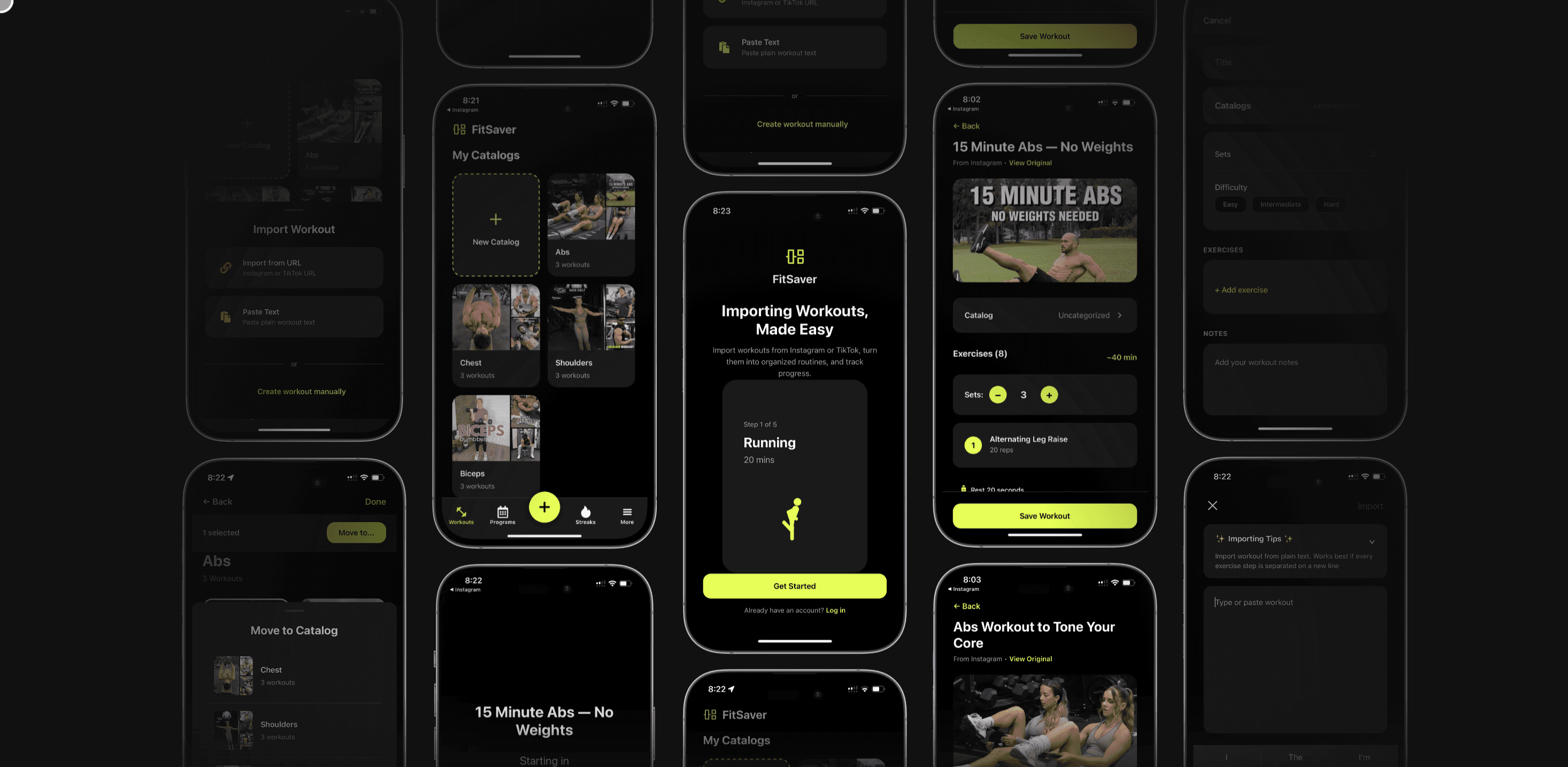
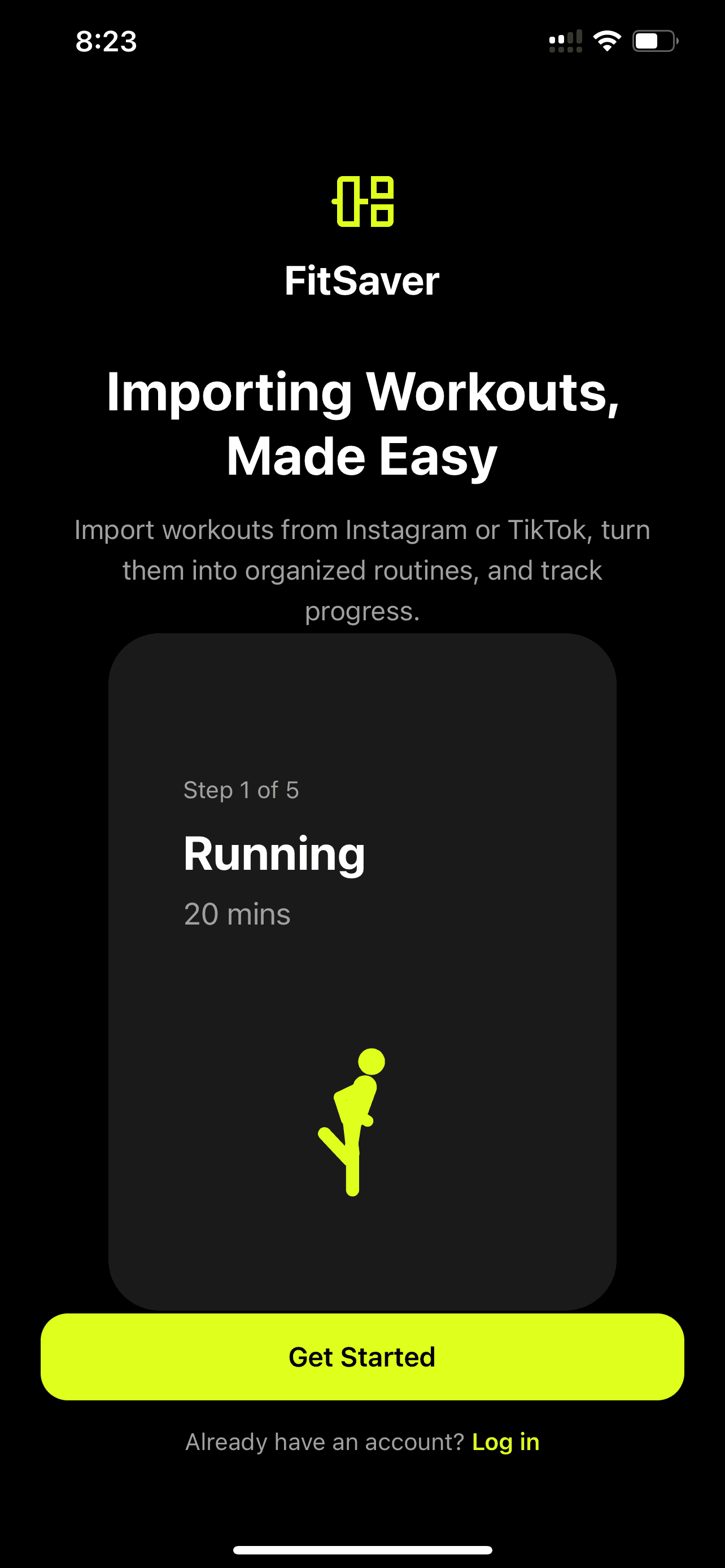
Apps like Fitsaver App focus specifically on converting Instagram and TikTok workouts into structured routines, which demonstrates how specialized features can turn saved videos into actionable plans.
How to Organize Saved Workout Videos Step by Step
Organizing workouts can feel like a big task at first, but a few systematic steps make it manageable. The process below works whether using a dedicated app or a simple folder/tagging system.
Step 1 — Gather Everything in One Place
First, consolidate saved videos. If clips are saved across Instagram, TikTok, and local files, bring links or copies into a single app or cloud folder. Centralizing avoids wasted time hunting through different platforms.
Step 2 — Create a Tagging System
Tags become the backbone of quick searches and filters. Use short, consistent tags such as:
#legs
Consistency matters more than complexity. A handful of reliable tags beats a long, messy list.
Step 3 — Add Essential Metadata
For each saved clip, add these quick notes:
Primary muscle group
Equipment needed
Approximate duration
Suggested sets/reps or time-based work
Intensity level
When videos lack set/rep info, make a short recommendation based on the move and typical programming — for example, "squat jumps — 3 x 10, 60s rest" or "banded pull-apart — 3 x 15 (warm-up)." If using a workout video organizer app, these fields should be easy to edit and save to each clip's entry.
Step 4 — Group and Prioritize
Create folders or collections for common themes: "Leg Day," "Push," "Quick Home Workouts," "Cardio Finishers," or "Mobility & Recovery." Prioritize collections that match one’s goals. Someone training for strength might keep longer compound lifts at the top, while a person seeking fat loss might favor HIIT and full-body circuits.
Step 5 — Build Routines from Clips
Turn collections into ordered routines. A simple template helps:
Warm-up — 5–10 minutes
Main lifts/exercises — structured sets and reps
Accessory work — targeted movements
Finisher/conditioning — short high-effort work
Cooldown/mobility — 5–10 minutes
When assembling routines, place videos in the exact sequence they'll be performed. If the app supports timers and rest intervals, set those too. This saves cognitive load during a workout and helps preserve tempo and intensity.
Designing Effective Routines From Short Videos
Short-form videos often demonstrate a single move or a quick circuit. That’s useful, but to build real progress, routines must include context: how many sets, when to progress, and how to mix effort across a session.
Template 1 — Strength-Focused Session
Warm-up (5–8 min): dynamic mobility video + light activation movement
Main lift (20–30 min): 3–5 sets of 3–8 reps — link to the coach's technique clip
Accessory circuit (10–15 min): 3 rounds of 3 moves, 8–15 reps each
Cooldown (5 min): mobility/stretching clip
When importing clips, add recommended load progression (e.g., increase 2–5% every week or add a rep when the final set feels manageable).
Template 2 — Time-Efficient Home Workout
Warm-up (3–5 min): 1–2 movement clips
AMRAP or circuit (20 min): 4–5 exercises from saved clips, rotate every minute
Cooldown (3–5 min): breathing and shoulder mobility
Short clips fit perfectly into circuits. A workout video organizer lets users assemble these in advance so a 20-minute session starts immediately without scrolling.
Template 3 — Mobility and Recovery Routine
Activation (5 min): foam rolling or band activation
Mobility sequence (10–15 min): video-guided flows by body part
Breathwork and relaxation (5 min)
Tagging mobility clips with "prehab" or "recovery" ensures they're visible on lighter training days.
Practical Tips for Turning Clips into Progress
Turning saved content into meaningful gains requires more than a list of moves. These tips help create routines that actually drive results.
Keep a progression plan: For each routine, note how to progress: add weight, increase reps, reduce rest, or add sets.
Track results: Log weights, reps, and subjective effort. Over weeks, a user can see improvements or need to adjust.
Balance intensity across the week: Schedule hard sessions, moderate sessions, and recovery sessions to prevent burnout.
Use substitutes: Add alternative moves for limited equipment. For instance, swap barbell squats with goblet squats if a barbell isn’t available.
Limit the playlist length: A typical routine should contain 6–12 core items. Too many clips clutter the session and reduce focus.
Give each clip context: A 30-second Instagram demo needs a written note — "3 x 12 tempo 2-0-1" — so it fits the plan.
How a Dedicated App Makes the Difference
A dedicated workout video organizer app removes friction. Instead of copying notes into a spreadsheet or juggling screenshots, apps provide fields, templates, and automation that save time and keep sessions consistent. Features that users often value include:
One-tap import: Add an Instagram or TikTok link and auto-fill basic metadata.
Auto-suggest sets/reps: The app recommends programming based on exercise type and user's goal.
Sync with calendar: Routines appear alongside work schedules for easier planning.
Built-in timers: No need to switch apps mid-workout.
Progress snapshots: Store notes, PRs, and photos with each routine.
Fitsaver App, for example, specializes as a workout video organizer that converts Instagram and TikTok videos into structured routines, letting users plan gym or home workouts without distractions. That kind of automation is especially helpful for social-media-savvy fitness fans who discover workouts across platforms.
Handling Common Challenges
Even with a good organizer, some hurdles appear frequently. Addressing these upfront saves headaches.
Issue — Videos Without Programming
Short demo clips often don't specify sets, reps, or rest. A practical approach is to assign a default template:
Strength moves: 3–5 sets of 3–8 reps
Hypertrophy moves: 3–4 sets of 8–15 reps
Bodyweight or plyometric moves: 3–5 sets, reps or timed intervals depending on intensity
When someone curates multiple similar clips, the organizer can prompt them to fill these fields once rather than for every video.
Issue — Incorrect Form in Clips
Not all online videos show perfect technique. Use the organizer to flag questionable content. If a clip is inspiring but technically flawed, attach a note with corrections or pair it with a trusted coaching video.
Issue — Equipment Differences
Saved videos may assume equipment that the user doesn’t own. Good organizers include easy substitutions and filters so routines adapt to what’s available — for instance, replacing barbell rows with single-arm dumbbell rows.
Privacy, Copyright, and Platform Rules
Using social-media clips raises important legal and ethical questions. Here’s how an organized strategy keeps things safe and respectful:
Link instead of download: Where possible, store links to the original post rather than saving copies. This respects the creator’s ownership and keeps content up-to-date.
Credit creators: If sharing a routine publicly, credit the original coach or influencer and follow platform-specific rules for reposting.
Respect copyrighted music: Many short videos include music. If an organizer app caches copies for offline use, ensure it complies with the social platform’s terms.
Keep personal libraries private: Users expect private logs for their training. Ensure the app has clear privacy settings.
Case Studies: Real-World Workflows
Practical examples show how a workout video organizer works for different lifestyles.
Case 1 — The Busy Student
Alex is juggling classes and part-time work. He saves quick 15–20 minute HIIT circuits on TikTok. Using a workout video organizer, Alex groups those clips into "Quick 20" routines, tags them by intensity, and schedules three sessions per week. On exam weeks, he switches to "Mobility & Sleep" routines. The organizer's calendar and timers let him start workouts without deciding the structure on the fly.
Case 2 — The Home-Gym Enthusiast
Priya has a set of adjustable dumbbells and a pull-up bar. She follows multiple IG trainers. Using an organizer app, Priya tags moves by equipment and skill level, creates a 4-week program focused on hypertrophy, and adds substitutes for days when she only wants a 30-minute session. Progress tracking shows steady increases in reps and weight, which helps maintain motivation.
Case 3 — The Social Media Curator
Jordan builds public routines to share with followers. He curates TikTok clips from trusted coaches, adds set/rep recommendations, and credits creators in the routine description. The workout video organizer makes it easy to publish clean, professional-looking routines while keeping original links intact.
Advanced Organization Strategies
For users who want to get granular, the following strategies make libraries powerful and future-proof.
Use a Hierarchical Tag System
Combine broad and specific tags — e.g., #strength + #lowerbody + #barbell + #week1. This allows complex filtering like "show strength-oriented barbell lower-body moves in week 1."
Create Macro Templates
Standardize templates for common sessions: "Upper Strength," "Lower Hypertrophy," "Express Core." When assembling a routine, start from a template to ensure balance and consistent volume.
Maintain an Exercise Substitution Sheet
Create a list of primary exercises and their acceptable alternatives by equipment or skill — for example:
Back Squat -> Goblet Squat (dumbbell), Bulgarian Split Squat (single-leg), Box Squat (beginner)
Barbell Row -> Dumbbell Row, TRX Row, Inverted Row
When a saved clip isn’t feasible in a gym, users can swap quickly without losing session integrity.
Integration With Wearables and Trackers
Many organizers support integration with Apple Health, Google Fit, and wearable devices. Syncing workout dates, heart rate zones, and calories burned creates a fuller view of progress. Seamless integration means less manual logging and more reliable data for programming decisions.
Choosing the Right Workout Video Organizer
When comparing options, users should consider their priorities:
Social-first discovery: Choose an organizer with smooth Instagram and TikTok imports.
Program-first planning: Look for robust routine templates and progression logic.
Tracking and analytics: If progress metrics matter, pick an app with logged sets and visual trends.
Privacy and sharing: Consider how easily routines can be shared or kept private.
Ease of use: A minimal, intuitive interface beats feature overload for most users.
Fitsaver App positions itself as a helpful middle ground for social-media-savvy users. It automates the heavy lifting of turning short clips into structured workouts and supports scheduling and distraction-free training — features that match the needs of the app’s audience.
Sample Weekly Plan Using a Workout Video Organizer
Here’s a practical 4-day split that someone could assemble from saved clips. Each session lists the type of clips to include.
Day 1 — Upper Strength
Warm-up: band pull-aparts + scapular activation clip
Main lift: 4 x 5 barbell bench press clip
Accessory: 3 x 8-12 dumbbell rows clip
Accessory: 3 x 10 triceps dip clip
Cooldown: upper-body mobility clip
Day 2 — Lower Hypertrophy
Warm-up: dynamic hip mobility clip
Main lift: 4 x 8 goblet squat clip
Accessory circuit: 3 rounds — Romanian deadlift (8), walking lunges (12/leg), calf raises (15)
Finisher: 10 min AMRAP bodyweight clip
Cooldown: hamstring stretch clip
Day 3 — Active Recovery
Mobility flow (15–20 min) — joint rotations and foam rolling clips
Light cardio: 20-minute brisk walk or cycling
Day 4 — Full-Body Conditioning
Warm-up: mobility + activation
EMOM or circuit (20 min): kettlebell swings, push-ups, squat jumps, plank variations
Cooldown and breathing
Using a workout video organizer, these clips are assembled into routines with timers and notes, making workouts start-to-finish without extra thinking.
Safety and Coaching Considerations
Short videos can't replace coaching. Organizers should be treated as tools to structure workouts, not as a substitute for professional instruction. A few safety tips:
Cross-check technique with trusted sources. Add coaching videos or cue lists alongside flashy clips.
Start with lower intensity if uncertain. Use lighter weights and focus on form for the first few sessions.
Use progress tracking to spot plateaus or nagging joint pain that may need a program adjustment.
Future Trends for Workout Video Organizers
As fitness and tech evolve, organizers will get smarter. A few trends to watch:
AI-assisted programming: Auto-building progressive plans from a user’s saved clips and goals.
Auto-tagging and transcription: Automatic extraction of exercise names, cues, and set suggestions from video captions or on-screen text.
Coach marketplaces: Integration with vetted trainers to review user-built routines or offer feedback.
Personalized analytics: Deeper insights tying workout video usage to progress trends like strength and body composition changes.
These features will reduce friction and make it easier to convert short-form inspiration into long-term results.
Conclusion
A smart workout video organizer turns the common scrolling habit into a training advantage. Instead of a disorganized gallery of saved clips, users get routines with sequence, context, and progression. That shift — from saving to scheduling — transforms motivation into consistent action.
Whether someone is a busy student, a home-gym enthusiast, or a social media curator, the right organizer brings clarity and saves time. Tools like the Fitsaver App exemplify how specialized features streamline the process: importing clips, adding metadata, building routines, scheduling workouts, and tracking progress. With an organized library, people spend less time deciding what to do and more time actually training.
Frequently Asked Questions
What exactly does a workout video organizer do?
A workout video organizer catalogs and structures short-form workout clips. It lets users import videos, add tags and notes, assemble clips into ordered routines, schedule workouts on a calendar, and track progress. The primary purpose is to convert random saved videos into actionable, repeatable workouts.
Can a workout video organizer work with Instagram and TikTok?
Yes. Many modern organizers support direct imports or smart linking from Instagram and TikTok. Instead of downloading content, they often store links and metadata, preserving credit to creators and minimizing storage needs. Apps like Fitsaver specialize in converting those social clips into routines.
Is it okay to base workouts on short social media videos?
Short clips are great for ideas and demonstrations, but they rarely provide full programming. It's best to use them as components within a structured routine that includes sets, reps, rest, and progression guidelines. Also, verify technique with trusted coaching sources and avoid blindly following high-intensity moves without proper preparation.
How does a workout video organizer help with progress tracking?
Organizers often include logging features where users record sets, reps, weights, and subjective effort. Over time, this creates a history that shows improvements or plateaus. Some apps also summarize weekly training load or highlight PRs, making it easier to objectively measure progress.
Are there privacy or copyright issues when using saved videos?
There can be. The safest approach is to link to original social posts rather than download and repost them. If sharing curated routines publicly, credit the creators and follow platform rules. Users should also confirm that any app used respects privacy and offers control over what’s shared publicly.

By the time Maya hit "save" on her tenth Instagram HIIT clip, her phone had become a digital shoebox of workouts — great moves, zero structure. A reliable workout video organizer changes that chaos into a clear plan, turning scattered TikTok and Instagram videos into a focused training session that fits into a busy week.
Why Organizing Workout Videos Matters
Fitness enthusiasts often collect short-form videos because they inspire new moves or fresh training styles. But inspiration rarely becomes progress by accident. When saved videos pile up without context, people lose track of what worked, how to progress, or which exercises match their goals. A workout video organizer solves three core problems:
Time wasted: Scrolling through dozens of clips eats time and focus.
Inconsistent training: Random workouts don't build consistent progress or apply principles like progressive overload.
Lost context: Videos often lack set/rep guidance, equipment notes, or modifications.
Organizing videos into routines gives structure, saves time, and makes it easy to measure progress — essential for anyone who wants results rather than scattered inspiration.
What Is a Workout Video Organizer?
A workout video organizer is a tool — usually an app or software feature — that helps users catalog, tag, arrange, and convert short-form workout clips into complete training sessions. Instead of a random list of saved posts, users get playlists or routines with ordered exercises, set/rep suggestions, rest intervals, warm-ups, and progress tracking.
At its simplest, a workout video organizer does three things:
Imports or links workout videos from platforms like Instagram and TikTok.
Lets users tag, sort, and group videos by muscle group, equipment, difficulty, or goal.
Builds structured sequences (routines) that can be scheduled, tracked, and repeated.
Core Features to Look For
Not every organizer is created equal. An effective workout video organizer should include these features to be genuinely useful:
Direct import or smart link: Ability to add videos from Instagram, TikTok, YouTube, or local storage without complex downloads.
Tagging and metadata: Custom tags for muscle group, intensity, equipment, duration, and goal.
Routine builder: Drag-and-drop interface to assemble videos into ordered workouts with sets, reps, and rest times.
Calendar and scheduling: Plan when to perform routines and see weekly volume at a glance.
Progress tracking: Log sets, weights, progress photos, and notes to track improvements.
Offline access: Ability to view routines and videos without cell service.
Substitutions and alternatives: Quick swap options for equipment or skill-level adjustments.
Privacy and sharing controls: Keep personal libraries private or share curated routines publicly.
Apps like Fitsaver App focus specifically on converting Instagram and TikTok workouts into structured routines, which demonstrates how specialized features can turn saved videos into actionable plans.
How to Organize Saved Workout Videos Step by Step
Organizing workouts can feel like a big task at first, but a few systematic steps make it manageable. The process below works whether using a dedicated app or a simple folder/tagging system.
Step 1 — Gather Everything in One Place
First, consolidate saved videos. If clips are saved across Instagram, TikTok, and local files, bring links or copies into a single app or cloud folder. Centralizing avoids wasted time hunting through different platforms.
Step 2 — Create a Tagging System
Tags become the backbone of quick searches and filters. Use short, consistent tags such as:
#legs
Consistency matters more than complexity. A handful of reliable tags beats a long, messy list.
Step 3 — Add Essential Metadata
For each saved clip, add these quick notes:
Primary muscle group
Equipment needed
Approximate duration
Suggested sets/reps or time-based work
Intensity level
When videos lack set/rep info, make a short recommendation based on the move and typical programming — for example, "squat jumps — 3 x 10, 60s rest" or "banded pull-apart — 3 x 15 (warm-up)." If using a workout video organizer app, these fields should be easy to edit and save to each clip's entry.
Step 4 — Group and Prioritize
Create folders or collections for common themes: "Leg Day," "Push," "Quick Home Workouts," "Cardio Finishers," or "Mobility & Recovery." Prioritize collections that match one’s goals. Someone training for strength might keep longer compound lifts at the top, while a person seeking fat loss might favor HIIT and full-body circuits.
Step 5 — Build Routines from Clips
Turn collections into ordered routines. A simple template helps:
Warm-up — 5–10 minutes
Main lifts/exercises — structured sets and reps
Accessory work — targeted movements
Finisher/conditioning — short high-effort work
Cooldown/mobility — 5–10 minutes
When assembling routines, place videos in the exact sequence they'll be performed. If the app supports timers and rest intervals, set those too. This saves cognitive load during a workout and helps preserve tempo and intensity.
Designing Effective Routines From Short Videos
Short-form videos often demonstrate a single move or a quick circuit. That’s useful, but to build real progress, routines must include context: how many sets, when to progress, and how to mix effort across a session.
Template 1 — Strength-Focused Session
Warm-up (5–8 min): dynamic mobility video + light activation movement
Main lift (20–30 min): 3–5 sets of 3–8 reps — link to the coach's technique clip
Accessory circuit (10–15 min): 3 rounds of 3 moves, 8–15 reps each
Cooldown (5 min): mobility/stretching clip
When importing clips, add recommended load progression (e.g., increase 2–5% every week or add a rep when the final set feels manageable).
Template 2 — Time-Efficient Home Workout
Warm-up (3–5 min): 1–2 movement clips
AMRAP or circuit (20 min): 4–5 exercises from saved clips, rotate every minute
Cooldown (3–5 min): breathing and shoulder mobility
Short clips fit perfectly into circuits. A workout video organizer lets users assemble these in advance so a 20-minute session starts immediately without scrolling.
Template 3 — Mobility and Recovery Routine
Activation (5 min): foam rolling or band activation
Mobility sequence (10–15 min): video-guided flows by body part
Breathwork and relaxation (5 min)
Tagging mobility clips with "prehab" or "recovery" ensures they're visible on lighter training days.
Practical Tips for Turning Clips into Progress
Turning saved content into meaningful gains requires more than a list of moves. These tips help create routines that actually drive results.
Keep a progression plan: For each routine, note how to progress: add weight, increase reps, reduce rest, or add sets.
Track results: Log weights, reps, and subjective effort. Over weeks, a user can see improvements or need to adjust.
Balance intensity across the week: Schedule hard sessions, moderate sessions, and recovery sessions to prevent burnout.
Use substitutes: Add alternative moves for limited equipment. For instance, swap barbell squats with goblet squats if a barbell isn’t available.
Limit the playlist length: A typical routine should contain 6–12 core items. Too many clips clutter the session and reduce focus.
Give each clip context: A 30-second Instagram demo needs a written note — "3 x 12 tempo 2-0-1" — so it fits the plan.
How a Dedicated App Makes the Difference
A dedicated workout video organizer app removes friction. Instead of copying notes into a spreadsheet or juggling screenshots, apps provide fields, templates, and automation that save time and keep sessions consistent. Features that users often value include:
One-tap import: Add an Instagram or TikTok link and auto-fill basic metadata.
Auto-suggest sets/reps: The app recommends programming based on exercise type and user's goal.
Sync with calendar: Routines appear alongside work schedules for easier planning.
Built-in timers: No need to switch apps mid-workout.
Progress snapshots: Store notes, PRs, and photos with each routine.
Fitsaver App, for example, specializes as a workout video organizer that converts Instagram and TikTok videos into structured routines, letting users plan gym or home workouts without distractions. That kind of automation is especially helpful for social-media-savvy fitness fans who discover workouts across platforms.
Handling Common Challenges
Even with a good organizer, some hurdles appear frequently. Addressing these upfront saves headaches.
Issue — Videos Without Programming
Short demo clips often don't specify sets, reps, or rest. A practical approach is to assign a default template:
Strength moves: 3–5 sets of 3–8 reps
Hypertrophy moves: 3–4 sets of 8–15 reps
Bodyweight or plyometric moves: 3–5 sets, reps or timed intervals depending on intensity
When someone curates multiple similar clips, the organizer can prompt them to fill these fields once rather than for every video.
Issue — Incorrect Form in Clips
Not all online videos show perfect technique. Use the organizer to flag questionable content. If a clip is inspiring but technically flawed, attach a note with corrections or pair it with a trusted coaching video.
Issue — Equipment Differences
Saved videos may assume equipment that the user doesn’t own. Good organizers include easy substitutions and filters so routines adapt to what’s available — for instance, replacing barbell rows with single-arm dumbbell rows.
Privacy, Copyright, and Platform Rules
Using social-media clips raises important legal and ethical questions. Here’s how an organized strategy keeps things safe and respectful:
Link instead of download: Where possible, store links to the original post rather than saving copies. This respects the creator’s ownership and keeps content up-to-date.
Credit creators: If sharing a routine publicly, credit the original coach or influencer and follow platform-specific rules for reposting.
Respect copyrighted music: Many short videos include music. If an organizer app caches copies for offline use, ensure it complies with the social platform’s terms.
Keep personal libraries private: Users expect private logs for their training. Ensure the app has clear privacy settings.
Case Studies: Real-World Workflows
Practical examples show how a workout video organizer works for different lifestyles.
Case 1 — The Busy Student
Alex is juggling classes and part-time work. He saves quick 15–20 minute HIIT circuits on TikTok. Using a workout video organizer, Alex groups those clips into "Quick 20" routines, tags them by intensity, and schedules three sessions per week. On exam weeks, he switches to "Mobility & Sleep" routines. The organizer's calendar and timers let him start workouts without deciding the structure on the fly.
Case 2 — The Home-Gym Enthusiast
Priya has a set of adjustable dumbbells and a pull-up bar. She follows multiple IG trainers. Using an organizer app, Priya tags moves by equipment and skill level, creates a 4-week program focused on hypertrophy, and adds substitutes for days when she only wants a 30-minute session. Progress tracking shows steady increases in reps and weight, which helps maintain motivation.
Case 3 — The Social Media Curator
Jordan builds public routines to share with followers. He curates TikTok clips from trusted coaches, adds set/rep recommendations, and credits creators in the routine description. The workout video organizer makes it easy to publish clean, professional-looking routines while keeping original links intact.
Advanced Organization Strategies
For users who want to get granular, the following strategies make libraries powerful and future-proof.
Use a Hierarchical Tag System
Combine broad and specific tags — e.g., #strength + #lowerbody + #barbell + #week1. This allows complex filtering like "show strength-oriented barbell lower-body moves in week 1."
Create Macro Templates
Standardize templates for common sessions: "Upper Strength," "Lower Hypertrophy," "Express Core." When assembling a routine, start from a template to ensure balance and consistent volume.
Maintain an Exercise Substitution Sheet
Create a list of primary exercises and their acceptable alternatives by equipment or skill — for example:
Back Squat -> Goblet Squat (dumbbell), Bulgarian Split Squat (single-leg), Box Squat (beginner)
Barbell Row -> Dumbbell Row, TRX Row, Inverted Row
When a saved clip isn’t feasible in a gym, users can swap quickly without losing session integrity.
Integration With Wearables and Trackers
Many organizers support integration with Apple Health, Google Fit, and wearable devices. Syncing workout dates, heart rate zones, and calories burned creates a fuller view of progress. Seamless integration means less manual logging and more reliable data for programming decisions.
Choosing the Right Workout Video Organizer
When comparing options, users should consider their priorities:
Social-first discovery: Choose an organizer with smooth Instagram and TikTok imports.
Program-first planning: Look for robust routine templates and progression logic.
Tracking and analytics: If progress metrics matter, pick an app with logged sets and visual trends.
Privacy and sharing: Consider how easily routines can be shared or kept private.
Ease of use: A minimal, intuitive interface beats feature overload for most users.
Fitsaver App positions itself as a helpful middle ground for social-media-savvy users. It automates the heavy lifting of turning short clips into structured workouts and supports scheduling and distraction-free training — features that match the needs of the app’s audience.
Sample Weekly Plan Using a Workout Video Organizer
Here’s a practical 4-day split that someone could assemble from saved clips. Each session lists the type of clips to include.
Day 1 — Upper Strength
Warm-up: band pull-aparts + scapular activation clip
Main lift: 4 x 5 barbell bench press clip
Accessory: 3 x 8-12 dumbbell rows clip
Accessory: 3 x 10 triceps dip clip
Cooldown: upper-body mobility clip
Day 2 — Lower Hypertrophy
Warm-up: dynamic hip mobility clip
Main lift: 4 x 8 goblet squat clip
Accessory circuit: 3 rounds — Romanian deadlift (8), walking lunges (12/leg), calf raises (15)
Finisher: 10 min AMRAP bodyweight clip
Cooldown: hamstring stretch clip
Day 3 — Active Recovery
Mobility flow (15–20 min) — joint rotations and foam rolling clips
Light cardio: 20-minute brisk walk or cycling
Day 4 — Full-Body Conditioning
Warm-up: mobility + activation
EMOM or circuit (20 min): kettlebell swings, push-ups, squat jumps, plank variations
Cooldown and breathing
Using a workout video organizer, these clips are assembled into routines with timers and notes, making workouts start-to-finish without extra thinking.
Safety and Coaching Considerations
Short videos can't replace coaching. Organizers should be treated as tools to structure workouts, not as a substitute for professional instruction. A few safety tips:
Cross-check technique with trusted sources. Add coaching videos or cue lists alongside flashy clips.
Start with lower intensity if uncertain. Use lighter weights and focus on form for the first few sessions.
Use progress tracking to spot plateaus or nagging joint pain that may need a program adjustment.
Future Trends for Workout Video Organizers
As fitness and tech evolve, organizers will get smarter. A few trends to watch:
AI-assisted programming: Auto-building progressive plans from a user’s saved clips and goals.
Auto-tagging and transcription: Automatic extraction of exercise names, cues, and set suggestions from video captions or on-screen text.
Coach marketplaces: Integration with vetted trainers to review user-built routines or offer feedback.
Personalized analytics: Deeper insights tying workout video usage to progress trends like strength and body composition changes.
These features will reduce friction and make it easier to convert short-form inspiration into long-term results.
Conclusion
A smart workout video organizer turns the common scrolling habit into a training advantage. Instead of a disorganized gallery of saved clips, users get routines with sequence, context, and progression. That shift — from saving to scheduling — transforms motivation into consistent action.
Whether someone is a busy student, a home-gym enthusiast, or a social media curator, the right organizer brings clarity and saves time. Tools like the Fitsaver App exemplify how specialized features streamline the process: importing clips, adding metadata, building routines, scheduling workouts, and tracking progress. With an organized library, people spend less time deciding what to do and more time actually training.
Frequently Asked Questions
What exactly does a workout video organizer do?
A workout video organizer catalogs and structures short-form workout clips. It lets users import videos, add tags and notes, assemble clips into ordered routines, schedule workouts on a calendar, and track progress. The primary purpose is to convert random saved videos into actionable, repeatable workouts.
Can a workout video organizer work with Instagram and TikTok?
Yes. Many modern organizers support direct imports or smart linking from Instagram and TikTok. Instead of downloading content, they often store links and metadata, preserving credit to creators and minimizing storage needs. Apps like Fitsaver specialize in converting those social clips into routines.
Is it okay to base workouts on short social media videos?
Short clips are great for ideas and demonstrations, but they rarely provide full programming. It's best to use them as components within a structured routine that includes sets, reps, rest, and progression guidelines. Also, verify technique with trusted coaching sources and avoid blindly following high-intensity moves without proper preparation.
How does a workout video organizer help with progress tracking?
Organizers often include logging features where users record sets, reps, weights, and subjective effort. Over time, this creates a history that shows improvements or plateaus. Some apps also summarize weekly training load or highlight PRs, making it easier to objectively measure progress.
Are there privacy or copyright issues when using saved videos?
There can be. The safest approach is to link to original social posts rather than download and repost them. If sharing curated routines publicly, credit the creators and follow platform rules. Users should also confirm that any app used respects privacy and offers control over what’s shared publicly.
By the time Maya hit "save" on her tenth Instagram HIIT clip, her phone had become a digital shoebox of workouts — great moves, zero structure. A reliable workout video organizer changes that chaos into a clear plan, turning scattered TikTok and Instagram videos into a focused training session that fits into a busy week.
Why Organizing Workout Videos Matters
Fitness enthusiasts often collect short-form videos because they inspire new moves or fresh training styles. But inspiration rarely becomes progress by accident. When saved videos pile up without context, people lose track of what worked, how to progress, or which exercises match their goals. A workout video organizer solves three core problems:
Time wasted: Scrolling through dozens of clips eats time and focus.
Inconsistent training: Random workouts don't build consistent progress or apply principles like progressive overload.
Lost context: Videos often lack set/rep guidance, equipment notes, or modifications.
Organizing videos into routines gives structure, saves time, and makes it easy to measure progress — essential for anyone who wants results rather than scattered inspiration.
What Is a Workout Video Organizer?
A workout video organizer is a tool — usually an app or software feature — that helps users catalog, tag, arrange, and convert short-form workout clips into complete training sessions. Instead of a random list of saved posts, users get playlists or routines with ordered exercises, set/rep suggestions, rest intervals, warm-ups, and progress tracking.
At its simplest, a workout video organizer does three things:
Imports or links workout videos from platforms like Instagram and TikTok.
Lets users tag, sort, and group videos by muscle group, equipment, difficulty, or goal.
Builds structured sequences (routines) that can be scheduled, tracked, and repeated.
Core Features to Look For
Not every organizer is created equal. An effective workout video organizer should include these features to be genuinely useful:
Direct import or smart link: Ability to add videos from Instagram, TikTok, YouTube, or local storage without complex downloads.
Tagging and metadata: Custom tags for muscle group, intensity, equipment, duration, and goal.
Routine builder: Drag-and-drop interface to assemble videos into ordered workouts with sets, reps, and rest times.
Calendar and scheduling: Plan when to perform routines and see weekly volume at a glance.
Progress tracking: Log sets, weights, progress photos, and notes to track improvements.
Offline access: Ability to view routines and videos without cell service.
Substitutions and alternatives: Quick swap options for equipment or skill-level adjustments.
Privacy and sharing controls: Keep personal libraries private or share curated routines publicly.
Apps like Fitsaver App focus specifically on converting Instagram and TikTok workouts into structured routines, which demonstrates how specialized features can turn saved videos into actionable plans.
How to Organize Saved Workout Videos Step by Step
Organizing workouts can feel like a big task at first, but a few systematic steps make it manageable. The process below works whether using a dedicated app or a simple folder/tagging system.
Step 1 — Gather Everything in One Place
First, consolidate saved videos. If clips are saved across Instagram, TikTok, and local files, bring links or copies into a single app or cloud folder. Centralizing avoids wasted time hunting through different platforms.
Step 2 — Create a Tagging System
Tags become the backbone of quick searches and filters. Use short, consistent tags such as:
#legs
Consistency matters more than complexity. A handful of reliable tags beats a long, messy list.
Step 3 — Add Essential Metadata
For each saved clip, add these quick notes:
Primary muscle group
Equipment needed
Approximate duration
Suggested sets/reps or time-based work
Intensity level
When videos lack set/rep info, make a short recommendation based on the move and typical programming — for example, "squat jumps — 3 x 10, 60s rest" or "banded pull-apart — 3 x 15 (warm-up)." If using a workout video organizer app, these fields should be easy to edit and save to each clip's entry.
Step 4 — Group and Prioritize
Create folders or collections for common themes: "Leg Day," "Push," "Quick Home Workouts," "Cardio Finishers," or "Mobility & Recovery." Prioritize collections that match one’s goals. Someone training for strength might keep longer compound lifts at the top, while a person seeking fat loss might favor HIIT and full-body circuits.
Step 5 — Build Routines from Clips
Turn collections into ordered routines. A simple template helps:
Warm-up — 5–10 minutes
Main lifts/exercises — structured sets and reps
Accessory work — targeted movements
Finisher/conditioning — short high-effort work
Cooldown/mobility — 5–10 minutes
When assembling routines, place videos in the exact sequence they'll be performed. If the app supports timers and rest intervals, set those too. This saves cognitive load during a workout and helps preserve tempo and intensity.
Designing Effective Routines From Short Videos
Short-form videos often demonstrate a single move or a quick circuit. That’s useful, but to build real progress, routines must include context: how many sets, when to progress, and how to mix effort across a session.
Template 1 — Strength-Focused Session
Warm-up (5–8 min): dynamic mobility video + light activation movement
Main lift (20–30 min): 3–5 sets of 3–8 reps — link to the coach's technique clip
Accessory circuit (10–15 min): 3 rounds of 3 moves, 8–15 reps each
Cooldown (5 min): mobility/stretching clip
When importing clips, add recommended load progression (e.g., increase 2–5% every week or add a rep when the final set feels manageable).
Template 2 — Time-Efficient Home Workout
Warm-up (3–5 min): 1–2 movement clips
AMRAP or circuit (20 min): 4–5 exercises from saved clips, rotate every minute
Cooldown (3–5 min): breathing and shoulder mobility
Short clips fit perfectly into circuits. A workout video organizer lets users assemble these in advance so a 20-minute session starts immediately without scrolling.
Template 3 — Mobility and Recovery Routine
Activation (5 min): foam rolling or band activation
Mobility sequence (10–15 min): video-guided flows by body part
Breathwork and relaxation (5 min)
Tagging mobility clips with "prehab" or "recovery" ensures they're visible on lighter training days.
Practical Tips for Turning Clips into Progress
Turning saved content into meaningful gains requires more than a list of moves. These tips help create routines that actually drive results.
Keep a progression plan: For each routine, note how to progress: add weight, increase reps, reduce rest, or add sets.
Track results: Log weights, reps, and subjective effort. Over weeks, a user can see improvements or need to adjust.
Balance intensity across the week: Schedule hard sessions, moderate sessions, and recovery sessions to prevent burnout.
Use substitutes: Add alternative moves for limited equipment. For instance, swap barbell squats with goblet squats if a barbell isn’t available.
Limit the playlist length: A typical routine should contain 6–12 core items. Too many clips clutter the session and reduce focus.
Give each clip context: A 30-second Instagram demo needs a written note — "3 x 12 tempo 2-0-1" — so it fits the plan.
How a Dedicated App Makes the Difference
A dedicated workout video organizer app removes friction. Instead of copying notes into a spreadsheet or juggling screenshots, apps provide fields, templates, and automation that save time and keep sessions consistent. Features that users often value include:
One-tap import: Add an Instagram or TikTok link and auto-fill basic metadata.
Auto-suggest sets/reps: The app recommends programming based on exercise type and user's goal.
Sync with calendar: Routines appear alongside work schedules for easier planning.
Built-in timers: No need to switch apps mid-workout.
Progress snapshots: Store notes, PRs, and photos with each routine.
Fitsaver App, for example, specializes as a workout video organizer that converts Instagram and TikTok videos into structured routines, letting users plan gym or home workouts without distractions. That kind of automation is especially helpful for social-media-savvy fitness fans who discover workouts across platforms.
Handling Common Challenges
Even with a good organizer, some hurdles appear frequently. Addressing these upfront saves headaches.
Issue — Videos Without Programming
Short demo clips often don't specify sets, reps, or rest. A practical approach is to assign a default template:
Strength moves: 3–5 sets of 3–8 reps
Hypertrophy moves: 3–4 sets of 8–15 reps
Bodyweight or plyometric moves: 3–5 sets, reps or timed intervals depending on intensity
When someone curates multiple similar clips, the organizer can prompt them to fill these fields once rather than for every video.
Issue — Incorrect Form in Clips
Not all online videos show perfect technique. Use the organizer to flag questionable content. If a clip is inspiring but technically flawed, attach a note with corrections or pair it with a trusted coaching video.
Issue — Equipment Differences
Saved videos may assume equipment that the user doesn’t own. Good organizers include easy substitutions and filters so routines adapt to what’s available — for instance, replacing barbell rows with single-arm dumbbell rows.
Privacy, Copyright, and Platform Rules
Using social-media clips raises important legal and ethical questions. Here’s how an organized strategy keeps things safe and respectful:
Link instead of download: Where possible, store links to the original post rather than saving copies. This respects the creator’s ownership and keeps content up-to-date.
Credit creators: If sharing a routine publicly, credit the original coach or influencer and follow platform-specific rules for reposting.
Respect copyrighted music: Many short videos include music. If an organizer app caches copies for offline use, ensure it complies with the social platform’s terms.
Keep personal libraries private: Users expect private logs for their training. Ensure the app has clear privacy settings.
Case Studies: Real-World Workflows
Practical examples show how a workout video organizer works for different lifestyles.
Case 1 — The Busy Student
Alex is juggling classes and part-time work. He saves quick 15–20 minute HIIT circuits on TikTok. Using a workout video organizer, Alex groups those clips into "Quick 20" routines, tags them by intensity, and schedules three sessions per week. On exam weeks, he switches to "Mobility & Sleep" routines. The organizer's calendar and timers let him start workouts without deciding the structure on the fly.
Case 2 — The Home-Gym Enthusiast
Priya has a set of adjustable dumbbells and a pull-up bar. She follows multiple IG trainers. Using an organizer app, Priya tags moves by equipment and skill level, creates a 4-week program focused on hypertrophy, and adds substitutes for days when she only wants a 30-minute session. Progress tracking shows steady increases in reps and weight, which helps maintain motivation.
Case 3 — The Social Media Curator
Jordan builds public routines to share with followers. He curates TikTok clips from trusted coaches, adds set/rep recommendations, and credits creators in the routine description. The workout video organizer makes it easy to publish clean, professional-looking routines while keeping original links intact.
Advanced Organization Strategies
For users who want to get granular, the following strategies make libraries powerful and future-proof.
Use a Hierarchical Tag System
Combine broad and specific tags — e.g., #strength + #lowerbody + #barbell + #week1. This allows complex filtering like "show strength-oriented barbell lower-body moves in week 1."
Create Macro Templates
Standardize templates for common sessions: "Upper Strength," "Lower Hypertrophy," "Express Core." When assembling a routine, start from a template to ensure balance and consistent volume.
Maintain an Exercise Substitution Sheet
Create a list of primary exercises and their acceptable alternatives by equipment or skill — for example:
Back Squat -> Goblet Squat (dumbbell), Bulgarian Split Squat (single-leg), Box Squat (beginner)
Barbell Row -> Dumbbell Row, TRX Row, Inverted Row
When a saved clip isn’t feasible in a gym, users can swap quickly without losing session integrity.
Integration With Wearables and Trackers
Many organizers support integration with Apple Health, Google Fit, and wearable devices. Syncing workout dates, heart rate zones, and calories burned creates a fuller view of progress. Seamless integration means less manual logging and more reliable data for programming decisions.
Choosing the Right Workout Video Organizer
When comparing options, users should consider their priorities:
Social-first discovery: Choose an organizer with smooth Instagram and TikTok imports.
Program-first planning: Look for robust routine templates and progression logic.
Tracking and analytics: If progress metrics matter, pick an app with logged sets and visual trends.
Privacy and sharing: Consider how easily routines can be shared or kept private.
Ease of use: A minimal, intuitive interface beats feature overload for most users.
Fitsaver App positions itself as a helpful middle ground for social-media-savvy users. It automates the heavy lifting of turning short clips into structured workouts and supports scheduling and distraction-free training — features that match the needs of the app’s audience.
Sample Weekly Plan Using a Workout Video Organizer
Here’s a practical 4-day split that someone could assemble from saved clips. Each session lists the type of clips to include.
Day 1 — Upper Strength
Warm-up: band pull-aparts + scapular activation clip
Main lift: 4 x 5 barbell bench press clip
Accessory: 3 x 8-12 dumbbell rows clip
Accessory: 3 x 10 triceps dip clip
Cooldown: upper-body mobility clip
Day 2 — Lower Hypertrophy
Warm-up: dynamic hip mobility clip
Main lift: 4 x 8 goblet squat clip
Accessory circuit: 3 rounds — Romanian deadlift (8), walking lunges (12/leg), calf raises (15)
Finisher: 10 min AMRAP bodyweight clip
Cooldown: hamstring stretch clip
Day 3 — Active Recovery
Mobility flow (15–20 min) — joint rotations and foam rolling clips
Light cardio: 20-minute brisk walk or cycling
Day 4 — Full-Body Conditioning
Warm-up: mobility + activation
EMOM or circuit (20 min): kettlebell swings, push-ups, squat jumps, plank variations
Cooldown and breathing
Using a workout video organizer, these clips are assembled into routines with timers and notes, making workouts start-to-finish without extra thinking.
Safety and Coaching Considerations
Short videos can't replace coaching. Organizers should be treated as tools to structure workouts, not as a substitute for professional instruction. A few safety tips:
Cross-check technique with trusted sources. Add coaching videos or cue lists alongside flashy clips.
Start with lower intensity if uncertain. Use lighter weights and focus on form for the first few sessions.
Use progress tracking to spot plateaus or nagging joint pain that may need a program adjustment.
Future Trends for Workout Video Organizers
As fitness and tech evolve, organizers will get smarter. A few trends to watch:
AI-assisted programming: Auto-building progressive plans from a user’s saved clips and goals.
Auto-tagging and transcription: Automatic extraction of exercise names, cues, and set suggestions from video captions or on-screen text.
Coach marketplaces: Integration with vetted trainers to review user-built routines or offer feedback.
Personalized analytics: Deeper insights tying workout video usage to progress trends like strength and body composition changes.
These features will reduce friction and make it easier to convert short-form inspiration into long-term results.
Conclusion
A smart workout video organizer turns the common scrolling habit into a training advantage. Instead of a disorganized gallery of saved clips, users get routines with sequence, context, and progression. That shift — from saving to scheduling — transforms motivation into consistent action.
Whether someone is a busy student, a home-gym enthusiast, or a social media curator, the right organizer brings clarity and saves time. Tools like the Fitsaver App exemplify how specialized features streamline the process: importing clips, adding metadata, building routines, scheduling workouts, and tracking progress. With an organized library, people spend less time deciding what to do and more time actually training.
Frequently Asked Questions
What exactly does a workout video organizer do?
A workout video organizer catalogs and structures short-form workout clips. It lets users import videos, add tags and notes, assemble clips into ordered routines, schedule workouts on a calendar, and track progress. The primary purpose is to convert random saved videos into actionable, repeatable workouts.
Can a workout video organizer work with Instagram and TikTok?
Yes. Many modern organizers support direct imports or smart linking from Instagram and TikTok. Instead of downloading content, they often store links and metadata, preserving credit to creators and minimizing storage needs. Apps like Fitsaver specialize in converting those social clips into routines.
Is it okay to base workouts on short social media videos?
Short clips are great for ideas and demonstrations, but they rarely provide full programming. It's best to use them as components within a structured routine that includes sets, reps, rest, and progression guidelines. Also, verify technique with trusted coaching sources and avoid blindly following high-intensity moves without proper preparation.
How does a workout video organizer help with progress tracking?
Organizers often include logging features where users record sets, reps, weights, and subjective effort. Over time, this creates a history that shows improvements or plateaus. Some apps also summarize weekly training load or highlight PRs, making it easier to objectively measure progress.
Are there privacy or copyright issues when using saved videos?
There can be. The safest approach is to link to original social posts rather than download and repost them. If sharing curated routines publicly, credit the creators and follow platform rules. Users should also confirm that any app used respects privacy and offers control over what’s shared publicly.