May 22, 2026
Solving the Frustrations of Can't Find Workouts Quickly In Saved Folders
May 22, 2026
Solving the Frustrations of Can't Find Workouts Quickly In Saved Folders
May 22, 2026
Solving the Frustrations of Can't Find Workouts Quickly In Saved Folders
frustrations of can't find workouts quickly ini saved folders strike at the worst possible moment: a user has 20 minutes between classes or meetings, they remember saving a perfect HIIT reel last month, but opening the saved folder turns into a scavenger hunt that eats the whole workout window. That wasted time, small as it sounds, chips away at consistency, motivation, and the simple joy of training.
Why Saved-Workout Chaos Happens
Fitness content on Instagram and TikTok is compact, compelling, and addictive. People save hundreds of short videos — rep schemes, mobility flows, 5-minute burners — and expect to find them later. Several factors turn those saved lists into chaos:
Lack of structure: Social platforms encourage impulse saves without categories or meaningful labels.
One-size-fits-all saved folder: A single “Saved” collection becomes a dumping ground for every fitness idea, recipe, or meme.
Inconsistent naming: Captions and creator tags vary wildly; saved items rarely include user-added context.
Platform limitations: Instagram and TikTok aren’t designed as workout libraries — their search and organizational tools are minimal.
Sheer volume: With dozens or hundreds of saved posts, even small friction in search becomes a big problem.
Real Consequences Beyond Annoyance
Where organization problems feel like a minor inconvenience, the real impact on fitness routines can be substantial:
Reduced training frequency: If finding a workout takes longer than doing it, users may skip the session.
Fragmented progress: Randomly selecting saved workouts prevents a progressive, periodized plan, hampering strength and adaptation.
Decision fatigue: Constantly choosing from a mountain of options wears down motivation.
Wasted mental energy: Time and focus spent hunting content is time not spent on movement or recovery.
Common Scenarios That Trigger the Frustration
Several everyday moments amplify the pain of not finding workouts quickly:
Pre-gym warm-up panic: Standing in the locker room and scrolling a saved folder instead of warming up.
Travel workouts: Needing a quick, equipment-free routine in a hotel room and failing to locate the saved bodyweight circuit.
Short windows: Lunch breaks, childcare gaps, or subway waits evaporate while searching for a remembered clip.
Training with friends: Trying to show a saved technique but fumbling through dozens of unrelated saves in public.
Organizational Principles That Actually Work
Taming saved-folder chaos starts with a set of practical, human-friendly principles. These aren’t theoretical; they’re tactics people can implement this evening and feel the difference.
1. Decide on a Single Source of Truth
Using multiple methods to store the same workout — a saved reel, a screenshot, a note — guarantees confusion. Users should pick one go-to place for ready-to-do workouts. For many social-media-first fitness enthusiasts, an app that turns saved videos into usable routines becomes that single source of truth.
2. Create a Simple Folder Taxonomy
Complex hierarchies fail because they require too much upkeep. A practical structure sticks to a few top-level folders and relies on tags or brief notes for nuance.
Top-level folders: Strength, Cardio, Mobility, Short/Travel, Program Phases (e.g., “Build”, “Cut”).
Use subfolders sparingly: Only when a folder grows beyond 30–40 items.
3. Standardize Naming Conventions
Sensible, consistent names make items searchable at a glance. Use a short prefix scheme like:
TYPE_DURATION_EQUIPMENT_OR_FOCUSExamples:
HIIT_20_NoEqStrength_45_BenchFocusMobility_10_Shoulders
4. Tag Liberally, Search Smart
Tags are flexible metadata. Tags such as legs, beginner, no-equipment, AMRAP let users filter without rigid folders. When a platform lacks tag features, use short, consistent caption notes or the app’s native tagging options.
5. Prioritize Actionable Over Aspirational Saves
Not every video deserves a permanent spot. If a reel highlights a one-off move or a far-off goal, it’s okay to archive it elsewhere or let it go. Prioritize routines the user will realistically execute in the next 4–6 weeks.
Practical Folder Structures and Naming Examples
Below are ready-made folder schemes users can copy, tailored to different lifestyles and training goals.
Starter Minimalist Structure
Workouts — Quick (≤20m)
Workouts — Gym
Workouts — Home
Mobility & Recovery
Athlete/Progress-Focused Structure
Program — Strength Phase
Program — Hypertrophy Phase
Conditioning
Technique Drills
Benchmarks & Tests
Urban Busy-Person Structure
5–15 Min Express
20–30 Min Lunch
Equipment-Free
Hotel/Travel
Example filename patterns in a consistent system could look like:
Strength_45_Barbell_SquatFocusQuick_12_BW_CoreBlastTravel_20_NoEquipment_FullBody
How a Workout Organizer App Fixes the Problem
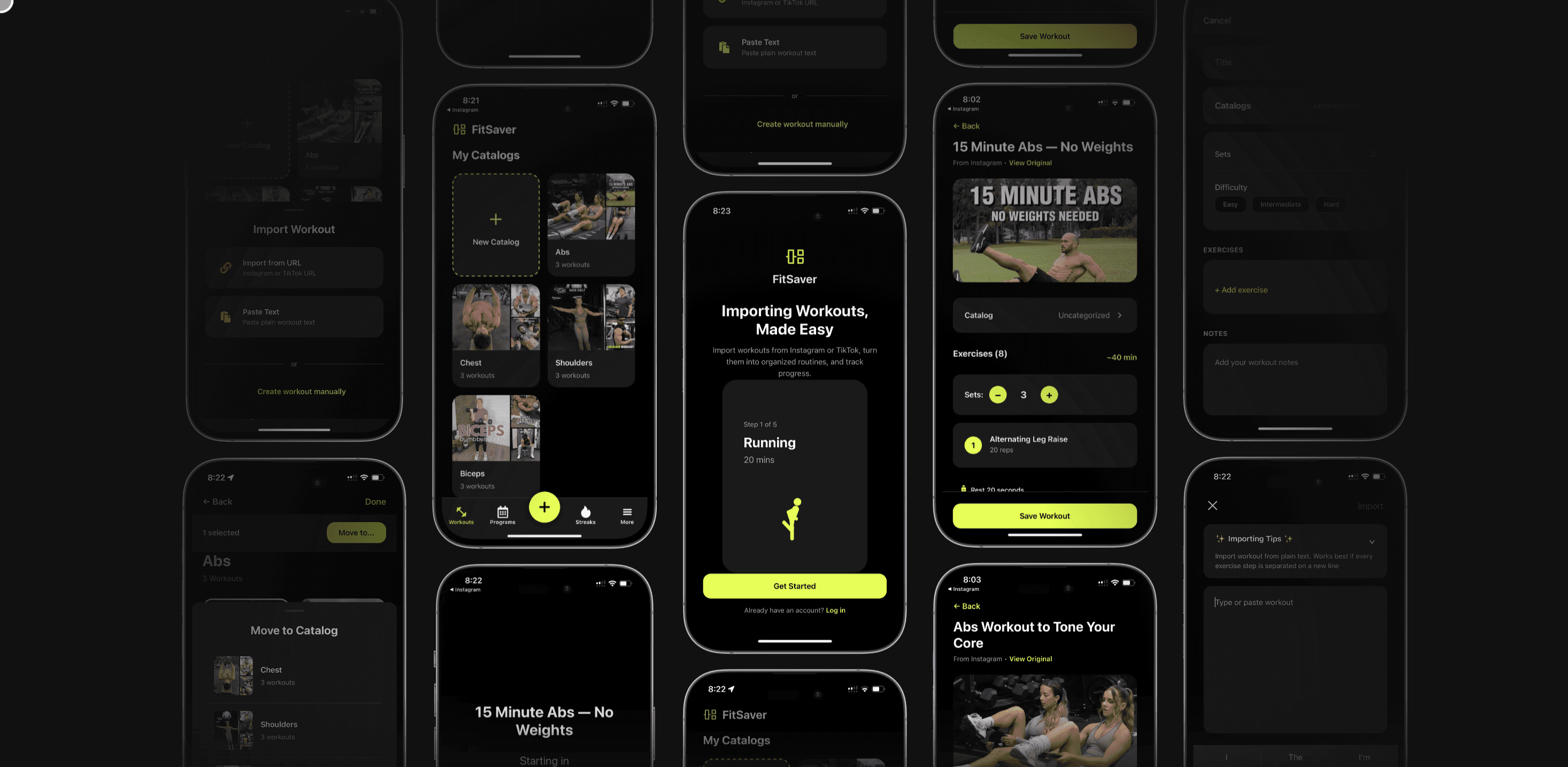
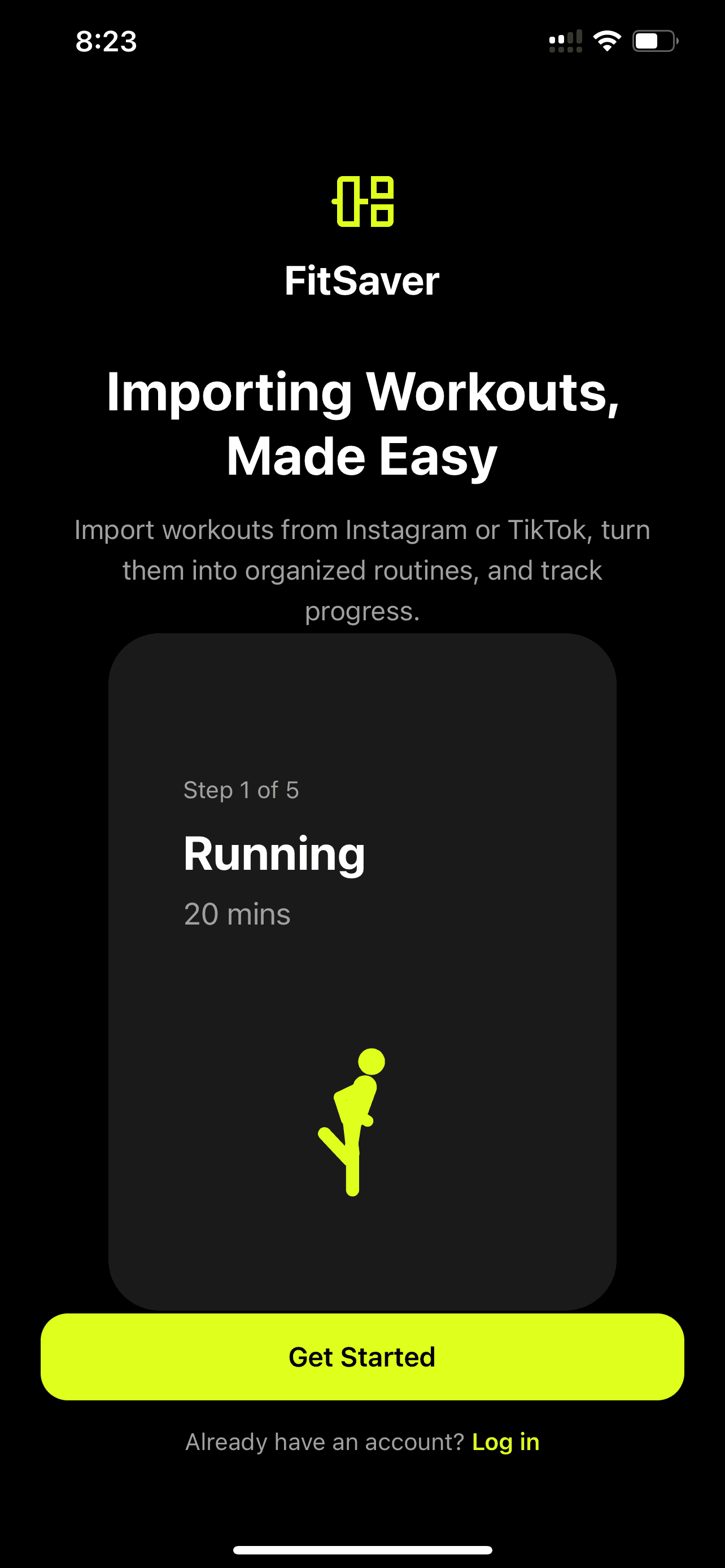
Apps designed for workout curation take saved social content and turn it into usable routines — that’s the exact pain Fitsaver App addresses. Rather than a long list of clips, users get structured sessions with clear steps, rest timers, and a calendar-ready view.
What a Good Organizer App Should Do
Import content from social platforms: Convert saved Instagram or TikTok videos into entries with thumbnails and source links.
Convert clips to routines: Break down a 60-second technique video into sets, reps, and tempo suggestions, so it's actionable.
Tagging and search: Allow users to add tags (e.g., glutes, 8–12 reps, no equipment) and filter quickly.
Folders and plans: Let users group workouts into programs or weekly plans that sync with calendars.
Minimal friction during training: Full-screen, distraction-free workout mode with timers and progress tracking.
Fitsaver converts short-form social content into structured routines and lets users plan gym or home sessions with minimal friction. Instead of scrolling, a user opens a planned session and follows the routine — no hunting required.
Step-by-Step Workflow to Reclaim Saved Workout Time
These steps form a practical routine for transforming a messy saved folder into an efficient workout library.
Audit the saved folder: Set a 30-minute timer and quickly remove anything clearly irrelevant.
Prioritize: Move the top 15–25 items likely to be used in the next month into main folders (or import them into an organizer app).
Convert key clips to routines: Use an app like Fitsaver to turn favorite videos into full workouts with sets, rest, and options for progressions.
Tag and name consistently: Apply 3–5 tags per routine and a short standardized name following the pattern TYPE_DURATION_FOCUS.
Create a 4-week plan: Drag routines into a weekly plan or calendar slots so that choosing a workout becomes a one-tap action.
Archive the rest: Move less relevant or aspiration content into an “Archive” that’s out of the main rotation but searchable.
Set a weekly maintenance habit: Spend 10–15 minutes each Sunday pruning or adding to the library.
Search, Filters, and Tags: Making Discovery Instant
Fast retrieval needs two elements: good metadata and a responsive search interface. Users should aim for:
Short, meaningful tags: Use single-word tags like legs, EMOM, or 6x.
Multiple tags per routine: Combine format, equipment, and goal tags for flexible filtering.
Saved searches or filters: If the tool allows, store common filters like “NoEquipment + ≤20m”.
Even on platforms without advanced tagging, users can embed search-friendly keywords in caption notes or file names to improve discovery.
Automation Tips: Save Time Upfront
A little automation cuts long-term maintenance costs. Here are smart automations that help:
Auto-import saved links: Use an app feature or a third-party automation (like a shortcut or Zapier) to send saved post links into the organizer instantly.
Template-based conversion: Create workout templates (e.g., “HIIT—20 minutes—AMRAP”) and apply them to newly imported clips in bulk.
Auto-tag by source or keyword: If the caption contains “no equipment,” auto-tag as no-equipment.
Calendar push: Automatically add planned routines to the phone calendar with reminders to reduce decision friction on the day.
Dealing With Cross-Platform Saved Content
Fitness content often lives across Instagram, TikTok, YouTube, and saved browser tabs. Consolidation matters.
Central import point: Choose one app to be the library hub (Fitsaver can serve this role for Instagram and TikTok content).
Use universal metadata: Apply the same tag and naming rules across platforms so searches work across the whole library.
Keep source links: Preserve the original link or creator name for context and credit.
Maintaining Momentum: Weekly Habits That Prevent Clutter
Organization isn’t a one-off project. A few small weekly habits keep things tidy:
Sunday tidy session: 10–15 minutes to drop new saves into folders and delete anything irrelevant.
Rotate a “Try This Week” slot: Keep one dedicated spot on the weekly plan for testing new saved workouts.
Track completion: Mark which routines were used and which weren’t to refine the library over time.
Case Study: From Clutter to Consistency
A typical example: A 26-year-old professional, who trains primarily at home, saved 320 reels over a year. Workouts were all in the platform’s default saved folder. After a 45-minute audit and importing 60 high-priority videos into Fitsaver, the user:
Converted 30 favorites into structured routines (with warm-ups, sets, and rest timers).
Built a 4-week plan that alternated full-body strength and conditioning days.
Set tags like 20-min, no-equipment, and glutes to filter quickly.
Result: The user went from skipping three planned workouts a week due to indecision to logging consistent sessions and tracking progress in reps and weights. The psychological benefit — reduced friction and less guilt — was as important as the physical gains.
When the App Isn’t Enough: Human Habits Matter
Even with a great tool, habits determine outcomes. The app reduces friction, but the user needs to use the app consistently. The most successful users pair a lightweight organizational system with realistic planning:
Plan workouts on set days rather than choosing spontaneously.
Batch import and organize new saves weekly.
Be ruthless about what stays in the active library.
Privacy and Creator Credit
When converting social content into routines, respondents should respect creators. Good practice includes:
Keeping source links and creator names attached to each routine.
Using routines for personal training only, unless explicit permission is given.
Tools and Integrations Worth Considering
Beyond a workout organizer, a few integrations can make the system seamless:
Calendar sync: Push planned workouts to phone calendars for timely reminders.
Health app integration: Sync completed sessions to Apple Health or Google Fit for consolidated tracking.
Cloud backups: Ensure the workout library persists across devices and account changes.
Sample 4-Week Plan Built From Saved Clips
Here’s a compact sample plan that turns saved short-form workouts into a progressive four-week cycle. Each day lists a sample routine type (users can import similar-length reels into the slots):
Week 1
Monday — Strength: Upper body (30 min)
Wednesday — Conditioning: 20-min AMRAP
Friday — Strength: Lower body (35 min)
Saturday — Mobility: 15-min full-body flow
Week 2
Monday — Strength: Upper body (increase load/week)
Wednesday — Conditioning: Intervals (shorter rest)
Friday — Strength: Lower body (add volume)
Saturday — Mobility + Active Recovery
Weeks 3–4
Progress intensity and test a benchmark at the end of week 4 (e.g., max reps in 5 minutes or 1RM test).
How Fitsaver Specifically Eases These Frustrations
Fitsaver App targets the exact pain points behind the frustrations of can't find workouts quickly ini saved folders by:
Turning saved clips into routines: Users import reels and tap a conversion option to get a step-by-step workout, not just a 30-second clip.
Offering planning tools: It’s possible to schedule converted routines into a weekly plan — choosing one is a click away.
Providing distraction-free training: Once a routine loads, the user sees timers and clear instructions rather than being lured back into social feeds.
Keeping source context: Each routine retains the creator’s link and credits, which helps with technique verification and ethical use.
For the Fitsaver audience — typically 18–35-year-olds who live between social media and real-life fitness — the app preserves the serendipity of discovering great content while removing the organizational friction that kills follow-through.
Checklist: Quick Wins to Implement Today
Set a 30-minute “saved folder audit” and remove obvious junk.
Choose one central app or folder to be the library hub.
Adopt a short naming convention and apply it to top 20 routines.
Convert 5 favorite saved reels into full routines this week.
Plan three workouts on the calendar for the upcoming week.
Schedule a 10-minute weekly maintenance window.
Conclusion
The frustrations of can't find workouts quickly ini saved folders are real, measurable, and fixable. The problem isn’t a lack of great content — it’s a lack of systems that make content actionable. By choosing a single source of truth, applying simple naming and tagging rules, scheduling regular maintenance, and using a dedicated workout organizer like Fitsaver to convert saved social clips into structured routines, users can reclaim lost time, restore consistency, and make training simpler and more satisfying.
Small changes in how workouts are saved, named, and scheduled produce outsized returns in motivation and results. For busy, social-media-savvy fitness enthusiasts, the path from saved chaos to a reliable workout routine runs through intentional organization and tools that remove friction. When the hunt stops, the training begins.
Frequently Asked Questions
How can someone start cleaning up hundreds of saved clips without feeling overwhelmed?
Begin with a single 30–45 minute audit. Delete anything obviously irrelevant, then move the top 20–30 likely-to-use items into a primary folder or import them into a workout organizer. Commit to converting a small batch (5–10) into actionable routines each week rather than trying to do everything at once.
Are tags better than folders?
Both have strengths. Folders are intuitive and fast for broad categories (e.g., “Gym” vs. “No Equipment”). Tags offer flexible cross-cutting filters (e.g., 20min + legs). The best system uses a few top-level folders plus consistent tags for nuance.
Can Fitsaver import from both Instagram and TikTok?
Fitsaver specializes in transforming Instagram and TikTok workout videos into structured fitness routines, allowing users to plan gym or home sessions and train distraction-free. Users should keep creator links and credit while converting content to routines.
What’s a good rule for how long to keep a saved clip in the active library?
A practical rule is the “4–6 week relevance” test: If a saved routine hasn’t been used or scheduled within 4–6 weeks, archive or delete it. That keeps the active library lean and focused on what’s actually being done.
How often should someone review their workout library?
Weekly maintenance of 10–15 minutes is ideal. That’s enough to add new favorites, remove outdated items, and keep plans fresh without creating maintenance fatigue.

frustrations of can't find workouts quickly ini saved folders strike at the worst possible moment: a user has 20 minutes between classes or meetings, they remember saving a perfect HIIT reel last month, but opening the saved folder turns into a scavenger hunt that eats the whole workout window. That wasted time, small as it sounds, chips away at consistency, motivation, and the simple joy of training.
Why Saved-Workout Chaos Happens
Fitness content on Instagram and TikTok is compact, compelling, and addictive. People save hundreds of short videos — rep schemes, mobility flows, 5-minute burners — and expect to find them later. Several factors turn those saved lists into chaos:
Lack of structure: Social platforms encourage impulse saves without categories or meaningful labels.
One-size-fits-all saved folder: A single “Saved” collection becomes a dumping ground for every fitness idea, recipe, or meme.
Inconsistent naming: Captions and creator tags vary wildly; saved items rarely include user-added context.
Platform limitations: Instagram and TikTok aren’t designed as workout libraries — their search and organizational tools are minimal.
Sheer volume: With dozens or hundreds of saved posts, even small friction in search becomes a big problem.
Real Consequences Beyond Annoyance
Where organization problems feel like a minor inconvenience, the real impact on fitness routines can be substantial:
Reduced training frequency: If finding a workout takes longer than doing it, users may skip the session.
Fragmented progress: Randomly selecting saved workouts prevents a progressive, periodized plan, hampering strength and adaptation.
Decision fatigue: Constantly choosing from a mountain of options wears down motivation.
Wasted mental energy: Time and focus spent hunting content is time not spent on movement or recovery.
Common Scenarios That Trigger the Frustration
Several everyday moments amplify the pain of not finding workouts quickly:
Pre-gym warm-up panic: Standing in the locker room and scrolling a saved folder instead of warming up.
Travel workouts: Needing a quick, equipment-free routine in a hotel room and failing to locate the saved bodyweight circuit.
Short windows: Lunch breaks, childcare gaps, or subway waits evaporate while searching for a remembered clip.
Training with friends: Trying to show a saved technique but fumbling through dozens of unrelated saves in public.
Organizational Principles That Actually Work
Taming saved-folder chaos starts with a set of practical, human-friendly principles. These aren’t theoretical; they’re tactics people can implement this evening and feel the difference.
1. Decide on a Single Source of Truth
Using multiple methods to store the same workout — a saved reel, a screenshot, a note — guarantees confusion. Users should pick one go-to place for ready-to-do workouts. For many social-media-first fitness enthusiasts, an app that turns saved videos into usable routines becomes that single source of truth.
2. Create a Simple Folder Taxonomy
Complex hierarchies fail because they require too much upkeep. A practical structure sticks to a few top-level folders and relies on tags or brief notes for nuance.
Top-level folders: Strength, Cardio, Mobility, Short/Travel, Program Phases (e.g., “Build”, “Cut”).
Use subfolders sparingly: Only when a folder grows beyond 30–40 items.
3. Standardize Naming Conventions
Sensible, consistent names make items searchable at a glance. Use a short prefix scheme like:
TYPE_DURATION_EQUIPMENT_OR_FOCUSExamples:
HIIT_20_NoEqStrength_45_BenchFocusMobility_10_Shoulders
4. Tag Liberally, Search Smart
Tags are flexible metadata. Tags such as legs, beginner, no-equipment, AMRAP let users filter without rigid folders. When a platform lacks tag features, use short, consistent caption notes or the app’s native tagging options.
5. Prioritize Actionable Over Aspirational Saves
Not every video deserves a permanent spot. If a reel highlights a one-off move or a far-off goal, it’s okay to archive it elsewhere or let it go. Prioritize routines the user will realistically execute in the next 4–6 weeks.
Practical Folder Structures and Naming Examples
Below are ready-made folder schemes users can copy, tailored to different lifestyles and training goals.
Starter Minimalist Structure
Workouts — Quick (≤20m)
Workouts — Gym
Workouts — Home
Mobility & Recovery
Athlete/Progress-Focused Structure
Program — Strength Phase
Program — Hypertrophy Phase
Conditioning
Technique Drills
Benchmarks & Tests
Urban Busy-Person Structure
5–15 Min Express
20–30 Min Lunch
Equipment-Free
Hotel/Travel
Example filename patterns in a consistent system could look like:
Strength_45_Barbell_SquatFocusQuick_12_BW_CoreBlastTravel_20_NoEquipment_FullBody
How a Workout Organizer App Fixes the Problem
Apps designed for workout curation take saved social content and turn it into usable routines — that’s the exact pain Fitsaver App addresses. Rather than a long list of clips, users get structured sessions with clear steps, rest timers, and a calendar-ready view.
What a Good Organizer App Should Do
Import content from social platforms: Convert saved Instagram or TikTok videos into entries with thumbnails and source links.
Convert clips to routines: Break down a 60-second technique video into sets, reps, and tempo suggestions, so it's actionable.
Tagging and search: Allow users to add tags (e.g., glutes, 8–12 reps, no equipment) and filter quickly.
Folders and plans: Let users group workouts into programs or weekly plans that sync with calendars.
Minimal friction during training: Full-screen, distraction-free workout mode with timers and progress tracking.
Fitsaver converts short-form social content into structured routines and lets users plan gym or home sessions with minimal friction. Instead of scrolling, a user opens a planned session and follows the routine — no hunting required.
Step-by-Step Workflow to Reclaim Saved Workout Time
These steps form a practical routine for transforming a messy saved folder into an efficient workout library.
Audit the saved folder: Set a 30-minute timer and quickly remove anything clearly irrelevant.
Prioritize: Move the top 15–25 items likely to be used in the next month into main folders (or import them into an organizer app).
Convert key clips to routines: Use an app like Fitsaver to turn favorite videos into full workouts with sets, rest, and options for progressions.
Tag and name consistently: Apply 3–5 tags per routine and a short standardized name following the pattern TYPE_DURATION_FOCUS.
Create a 4-week plan: Drag routines into a weekly plan or calendar slots so that choosing a workout becomes a one-tap action.
Archive the rest: Move less relevant or aspiration content into an “Archive” that’s out of the main rotation but searchable.
Set a weekly maintenance habit: Spend 10–15 minutes each Sunday pruning or adding to the library.
Search, Filters, and Tags: Making Discovery Instant
Fast retrieval needs two elements: good metadata and a responsive search interface. Users should aim for:
Short, meaningful tags: Use single-word tags like legs, EMOM, or 6x.
Multiple tags per routine: Combine format, equipment, and goal tags for flexible filtering.
Saved searches or filters: If the tool allows, store common filters like “NoEquipment + ≤20m”.
Even on platforms without advanced tagging, users can embed search-friendly keywords in caption notes or file names to improve discovery.
Automation Tips: Save Time Upfront
A little automation cuts long-term maintenance costs. Here are smart automations that help:
Auto-import saved links: Use an app feature or a third-party automation (like a shortcut or Zapier) to send saved post links into the organizer instantly.
Template-based conversion: Create workout templates (e.g., “HIIT—20 minutes—AMRAP”) and apply them to newly imported clips in bulk.
Auto-tag by source or keyword: If the caption contains “no equipment,” auto-tag as no-equipment.
Calendar push: Automatically add planned routines to the phone calendar with reminders to reduce decision friction on the day.
Dealing With Cross-Platform Saved Content
Fitness content often lives across Instagram, TikTok, YouTube, and saved browser tabs. Consolidation matters.
Central import point: Choose one app to be the library hub (Fitsaver can serve this role for Instagram and TikTok content).
Use universal metadata: Apply the same tag and naming rules across platforms so searches work across the whole library.
Keep source links: Preserve the original link or creator name for context and credit.
Maintaining Momentum: Weekly Habits That Prevent Clutter
Organization isn’t a one-off project. A few small weekly habits keep things tidy:
Sunday tidy session: 10–15 minutes to drop new saves into folders and delete anything irrelevant.
Rotate a “Try This Week” slot: Keep one dedicated spot on the weekly plan for testing new saved workouts.
Track completion: Mark which routines were used and which weren’t to refine the library over time.
Case Study: From Clutter to Consistency
A typical example: A 26-year-old professional, who trains primarily at home, saved 320 reels over a year. Workouts were all in the platform’s default saved folder. After a 45-minute audit and importing 60 high-priority videos into Fitsaver, the user:
Converted 30 favorites into structured routines (with warm-ups, sets, and rest timers).
Built a 4-week plan that alternated full-body strength and conditioning days.
Set tags like 20-min, no-equipment, and glutes to filter quickly.
Result: The user went from skipping three planned workouts a week due to indecision to logging consistent sessions and tracking progress in reps and weights. The psychological benefit — reduced friction and less guilt — was as important as the physical gains.
When the App Isn’t Enough: Human Habits Matter
Even with a great tool, habits determine outcomes. The app reduces friction, but the user needs to use the app consistently. The most successful users pair a lightweight organizational system with realistic planning:
Plan workouts on set days rather than choosing spontaneously.
Batch import and organize new saves weekly.
Be ruthless about what stays in the active library.
Privacy and Creator Credit
When converting social content into routines, respondents should respect creators. Good practice includes:
Keeping source links and creator names attached to each routine.
Using routines for personal training only, unless explicit permission is given.
Tools and Integrations Worth Considering
Beyond a workout organizer, a few integrations can make the system seamless:
Calendar sync: Push planned workouts to phone calendars for timely reminders.
Health app integration: Sync completed sessions to Apple Health or Google Fit for consolidated tracking.
Cloud backups: Ensure the workout library persists across devices and account changes.
Sample 4-Week Plan Built From Saved Clips
Here’s a compact sample plan that turns saved short-form workouts into a progressive four-week cycle. Each day lists a sample routine type (users can import similar-length reels into the slots):
Week 1
Monday — Strength: Upper body (30 min)
Wednesday — Conditioning: 20-min AMRAP
Friday — Strength: Lower body (35 min)
Saturday — Mobility: 15-min full-body flow
Week 2
Monday — Strength: Upper body (increase load/week)
Wednesday — Conditioning: Intervals (shorter rest)
Friday — Strength: Lower body (add volume)
Saturday — Mobility + Active Recovery
Weeks 3–4
Progress intensity and test a benchmark at the end of week 4 (e.g., max reps in 5 minutes or 1RM test).
How Fitsaver Specifically Eases These Frustrations
Fitsaver App targets the exact pain points behind the frustrations of can't find workouts quickly ini saved folders by:
Turning saved clips into routines: Users import reels and tap a conversion option to get a step-by-step workout, not just a 30-second clip.
Offering planning tools: It’s possible to schedule converted routines into a weekly plan — choosing one is a click away.
Providing distraction-free training: Once a routine loads, the user sees timers and clear instructions rather than being lured back into social feeds.
Keeping source context: Each routine retains the creator’s link and credits, which helps with technique verification and ethical use.
For the Fitsaver audience — typically 18–35-year-olds who live between social media and real-life fitness — the app preserves the serendipity of discovering great content while removing the organizational friction that kills follow-through.
Checklist: Quick Wins to Implement Today
Set a 30-minute “saved folder audit” and remove obvious junk.
Choose one central app or folder to be the library hub.
Adopt a short naming convention and apply it to top 20 routines.
Convert 5 favorite saved reels into full routines this week.
Plan three workouts on the calendar for the upcoming week.
Schedule a 10-minute weekly maintenance window.
Conclusion
The frustrations of can't find workouts quickly ini saved folders are real, measurable, and fixable. The problem isn’t a lack of great content — it’s a lack of systems that make content actionable. By choosing a single source of truth, applying simple naming and tagging rules, scheduling regular maintenance, and using a dedicated workout organizer like Fitsaver to convert saved social clips into structured routines, users can reclaim lost time, restore consistency, and make training simpler and more satisfying.
Small changes in how workouts are saved, named, and scheduled produce outsized returns in motivation and results. For busy, social-media-savvy fitness enthusiasts, the path from saved chaos to a reliable workout routine runs through intentional organization and tools that remove friction. When the hunt stops, the training begins.
Frequently Asked Questions
How can someone start cleaning up hundreds of saved clips without feeling overwhelmed?
Begin with a single 30–45 minute audit. Delete anything obviously irrelevant, then move the top 20–30 likely-to-use items into a primary folder or import them into a workout organizer. Commit to converting a small batch (5–10) into actionable routines each week rather than trying to do everything at once.
Are tags better than folders?
Both have strengths. Folders are intuitive and fast for broad categories (e.g., “Gym” vs. “No Equipment”). Tags offer flexible cross-cutting filters (e.g., 20min + legs). The best system uses a few top-level folders plus consistent tags for nuance.
Can Fitsaver import from both Instagram and TikTok?
Fitsaver specializes in transforming Instagram and TikTok workout videos into structured fitness routines, allowing users to plan gym or home sessions and train distraction-free. Users should keep creator links and credit while converting content to routines.
What’s a good rule for how long to keep a saved clip in the active library?
A practical rule is the “4–6 week relevance” test: If a saved routine hasn’t been used or scheduled within 4–6 weeks, archive or delete it. That keeps the active library lean and focused on what’s actually being done.
How often should someone review their workout library?
Weekly maintenance of 10–15 minutes is ideal. That’s enough to add new favorites, remove outdated items, and keep plans fresh without creating maintenance fatigue.
frustrations of can't find workouts quickly ini saved folders strike at the worst possible moment: a user has 20 minutes between classes or meetings, they remember saving a perfect HIIT reel last month, but opening the saved folder turns into a scavenger hunt that eats the whole workout window. That wasted time, small as it sounds, chips away at consistency, motivation, and the simple joy of training.
Why Saved-Workout Chaos Happens
Fitness content on Instagram and TikTok is compact, compelling, and addictive. People save hundreds of short videos — rep schemes, mobility flows, 5-minute burners — and expect to find them later. Several factors turn those saved lists into chaos:
Lack of structure: Social platforms encourage impulse saves without categories or meaningful labels.
One-size-fits-all saved folder: A single “Saved” collection becomes a dumping ground for every fitness idea, recipe, or meme.
Inconsistent naming: Captions and creator tags vary wildly; saved items rarely include user-added context.
Platform limitations: Instagram and TikTok aren’t designed as workout libraries — their search and organizational tools are minimal.
Sheer volume: With dozens or hundreds of saved posts, even small friction in search becomes a big problem.
Real Consequences Beyond Annoyance
Where organization problems feel like a minor inconvenience, the real impact on fitness routines can be substantial:
Reduced training frequency: If finding a workout takes longer than doing it, users may skip the session.
Fragmented progress: Randomly selecting saved workouts prevents a progressive, periodized plan, hampering strength and adaptation.
Decision fatigue: Constantly choosing from a mountain of options wears down motivation.
Wasted mental energy: Time and focus spent hunting content is time not spent on movement or recovery.
Common Scenarios That Trigger the Frustration
Several everyday moments amplify the pain of not finding workouts quickly:
Pre-gym warm-up panic: Standing in the locker room and scrolling a saved folder instead of warming up.
Travel workouts: Needing a quick, equipment-free routine in a hotel room and failing to locate the saved bodyweight circuit.
Short windows: Lunch breaks, childcare gaps, or subway waits evaporate while searching for a remembered clip.
Training with friends: Trying to show a saved technique but fumbling through dozens of unrelated saves in public.
Organizational Principles That Actually Work
Taming saved-folder chaos starts with a set of practical, human-friendly principles. These aren’t theoretical; they’re tactics people can implement this evening and feel the difference.
1. Decide on a Single Source of Truth
Using multiple methods to store the same workout — a saved reel, a screenshot, a note — guarantees confusion. Users should pick one go-to place for ready-to-do workouts. For many social-media-first fitness enthusiasts, an app that turns saved videos into usable routines becomes that single source of truth.
2. Create a Simple Folder Taxonomy
Complex hierarchies fail because they require too much upkeep. A practical structure sticks to a few top-level folders and relies on tags or brief notes for nuance.
Top-level folders: Strength, Cardio, Mobility, Short/Travel, Program Phases (e.g., “Build”, “Cut”).
Use subfolders sparingly: Only when a folder grows beyond 30–40 items.
3. Standardize Naming Conventions
Sensible, consistent names make items searchable at a glance. Use a short prefix scheme like:
TYPE_DURATION_EQUIPMENT_OR_FOCUSExamples:
HIIT_20_NoEqStrength_45_BenchFocusMobility_10_Shoulders
4. Tag Liberally, Search Smart
Tags are flexible metadata. Tags such as legs, beginner, no-equipment, AMRAP let users filter without rigid folders. When a platform lacks tag features, use short, consistent caption notes or the app’s native tagging options.
5. Prioritize Actionable Over Aspirational Saves
Not every video deserves a permanent spot. If a reel highlights a one-off move or a far-off goal, it’s okay to archive it elsewhere or let it go. Prioritize routines the user will realistically execute in the next 4–6 weeks.
Practical Folder Structures and Naming Examples
Below are ready-made folder schemes users can copy, tailored to different lifestyles and training goals.
Starter Minimalist Structure
Workouts — Quick (≤20m)
Workouts — Gym
Workouts — Home
Mobility & Recovery
Athlete/Progress-Focused Structure
Program — Strength Phase
Program — Hypertrophy Phase
Conditioning
Technique Drills
Benchmarks & Tests
Urban Busy-Person Structure
5–15 Min Express
20–30 Min Lunch
Equipment-Free
Hotel/Travel
Example filename patterns in a consistent system could look like:
Strength_45_Barbell_SquatFocusQuick_12_BW_CoreBlastTravel_20_NoEquipment_FullBody
How a Workout Organizer App Fixes the Problem
Apps designed for workout curation take saved social content and turn it into usable routines — that’s the exact pain Fitsaver App addresses. Rather than a long list of clips, users get structured sessions with clear steps, rest timers, and a calendar-ready view.
What a Good Organizer App Should Do
Import content from social platforms: Convert saved Instagram or TikTok videos into entries with thumbnails and source links.
Convert clips to routines: Break down a 60-second technique video into sets, reps, and tempo suggestions, so it's actionable.
Tagging and search: Allow users to add tags (e.g., glutes, 8–12 reps, no equipment) and filter quickly.
Folders and plans: Let users group workouts into programs or weekly plans that sync with calendars.
Minimal friction during training: Full-screen, distraction-free workout mode with timers and progress tracking.
Fitsaver converts short-form social content into structured routines and lets users plan gym or home sessions with minimal friction. Instead of scrolling, a user opens a planned session and follows the routine — no hunting required.
Step-by-Step Workflow to Reclaim Saved Workout Time
These steps form a practical routine for transforming a messy saved folder into an efficient workout library.
Audit the saved folder: Set a 30-minute timer and quickly remove anything clearly irrelevant.
Prioritize: Move the top 15–25 items likely to be used in the next month into main folders (or import them into an organizer app).
Convert key clips to routines: Use an app like Fitsaver to turn favorite videos into full workouts with sets, rest, and options for progressions.
Tag and name consistently: Apply 3–5 tags per routine and a short standardized name following the pattern TYPE_DURATION_FOCUS.
Create a 4-week plan: Drag routines into a weekly plan or calendar slots so that choosing a workout becomes a one-tap action.
Archive the rest: Move less relevant or aspiration content into an “Archive” that’s out of the main rotation but searchable.
Set a weekly maintenance habit: Spend 10–15 minutes each Sunday pruning or adding to the library.
Search, Filters, and Tags: Making Discovery Instant
Fast retrieval needs two elements: good metadata and a responsive search interface. Users should aim for:
Short, meaningful tags: Use single-word tags like legs, EMOM, or 6x.
Multiple tags per routine: Combine format, equipment, and goal tags for flexible filtering.
Saved searches or filters: If the tool allows, store common filters like “NoEquipment + ≤20m”.
Even on platforms without advanced tagging, users can embed search-friendly keywords in caption notes or file names to improve discovery.
Automation Tips: Save Time Upfront
A little automation cuts long-term maintenance costs. Here are smart automations that help:
Auto-import saved links: Use an app feature or a third-party automation (like a shortcut or Zapier) to send saved post links into the organizer instantly.
Template-based conversion: Create workout templates (e.g., “HIIT—20 minutes—AMRAP”) and apply them to newly imported clips in bulk.
Auto-tag by source or keyword: If the caption contains “no equipment,” auto-tag as no-equipment.
Calendar push: Automatically add planned routines to the phone calendar with reminders to reduce decision friction on the day.
Dealing With Cross-Platform Saved Content
Fitness content often lives across Instagram, TikTok, YouTube, and saved browser tabs. Consolidation matters.
Central import point: Choose one app to be the library hub (Fitsaver can serve this role for Instagram and TikTok content).
Use universal metadata: Apply the same tag and naming rules across platforms so searches work across the whole library.
Keep source links: Preserve the original link or creator name for context and credit.
Maintaining Momentum: Weekly Habits That Prevent Clutter
Organization isn’t a one-off project. A few small weekly habits keep things tidy:
Sunday tidy session: 10–15 minutes to drop new saves into folders and delete anything irrelevant.
Rotate a “Try This Week” slot: Keep one dedicated spot on the weekly plan for testing new saved workouts.
Track completion: Mark which routines were used and which weren’t to refine the library over time.
Case Study: From Clutter to Consistency
A typical example: A 26-year-old professional, who trains primarily at home, saved 320 reels over a year. Workouts were all in the platform’s default saved folder. After a 45-minute audit and importing 60 high-priority videos into Fitsaver, the user:
Converted 30 favorites into structured routines (with warm-ups, sets, and rest timers).
Built a 4-week plan that alternated full-body strength and conditioning days.
Set tags like 20-min, no-equipment, and glutes to filter quickly.
Result: The user went from skipping three planned workouts a week due to indecision to logging consistent sessions and tracking progress in reps and weights. The psychological benefit — reduced friction and less guilt — was as important as the physical gains.
When the App Isn’t Enough: Human Habits Matter
Even with a great tool, habits determine outcomes. The app reduces friction, but the user needs to use the app consistently. The most successful users pair a lightweight organizational system with realistic planning:
Plan workouts on set days rather than choosing spontaneously.
Batch import and organize new saves weekly.
Be ruthless about what stays in the active library.
Privacy and Creator Credit
When converting social content into routines, respondents should respect creators. Good practice includes:
Keeping source links and creator names attached to each routine.
Using routines for personal training only, unless explicit permission is given.
Tools and Integrations Worth Considering
Beyond a workout organizer, a few integrations can make the system seamless:
Calendar sync: Push planned workouts to phone calendars for timely reminders.
Health app integration: Sync completed sessions to Apple Health or Google Fit for consolidated tracking.
Cloud backups: Ensure the workout library persists across devices and account changes.
Sample 4-Week Plan Built From Saved Clips
Here’s a compact sample plan that turns saved short-form workouts into a progressive four-week cycle. Each day lists a sample routine type (users can import similar-length reels into the slots):
Week 1
Monday — Strength: Upper body (30 min)
Wednesday — Conditioning: 20-min AMRAP
Friday — Strength: Lower body (35 min)
Saturday — Mobility: 15-min full-body flow
Week 2
Monday — Strength: Upper body (increase load/week)
Wednesday — Conditioning: Intervals (shorter rest)
Friday — Strength: Lower body (add volume)
Saturday — Mobility + Active Recovery
Weeks 3–4
Progress intensity and test a benchmark at the end of week 4 (e.g., max reps in 5 minutes or 1RM test).
How Fitsaver Specifically Eases These Frustrations
Fitsaver App targets the exact pain points behind the frustrations of can't find workouts quickly ini saved folders by:
Turning saved clips into routines: Users import reels and tap a conversion option to get a step-by-step workout, not just a 30-second clip.
Offering planning tools: It’s possible to schedule converted routines into a weekly plan — choosing one is a click away.
Providing distraction-free training: Once a routine loads, the user sees timers and clear instructions rather than being lured back into social feeds.
Keeping source context: Each routine retains the creator’s link and credits, which helps with technique verification and ethical use.
For the Fitsaver audience — typically 18–35-year-olds who live between social media and real-life fitness — the app preserves the serendipity of discovering great content while removing the organizational friction that kills follow-through.
Checklist: Quick Wins to Implement Today
Set a 30-minute “saved folder audit” and remove obvious junk.
Choose one central app or folder to be the library hub.
Adopt a short naming convention and apply it to top 20 routines.
Convert 5 favorite saved reels into full routines this week.
Plan three workouts on the calendar for the upcoming week.
Schedule a 10-minute weekly maintenance window.
Conclusion
The frustrations of can't find workouts quickly ini saved folders are real, measurable, and fixable. The problem isn’t a lack of great content — it’s a lack of systems that make content actionable. By choosing a single source of truth, applying simple naming and tagging rules, scheduling regular maintenance, and using a dedicated workout organizer like Fitsaver to convert saved social clips into structured routines, users can reclaim lost time, restore consistency, and make training simpler and more satisfying.
Small changes in how workouts are saved, named, and scheduled produce outsized returns in motivation and results. For busy, social-media-savvy fitness enthusiasts, the path from saved chaos to a reliable workout routine runs through intentional organization and tools that remove friction. When the hunt stops, the training begins.
Frequently Asked Questions
How can someone start cleaning up hundreds of saved clips without feeling overwhelmed?
Begin with a single 30–45 minute audit. Delete anything obviously irrelevant, then move the top 20–30 likely-to-use items into a primary folder or import them into a workout organizer. Commit to converting a small batch (5–10) into actionable routines each week rather than trying to do everything at once.
Are tags better than folders?
Both have strengths. Folders are intuitive and fast for broad categories (e.g., “Gym” vs. “No Equipment”). Tags offer flexible cross-cutting filters (e.g., 20min + legs). The best system uses a few top-level folders plus consistent tags for nuance.
Can Fitsaver import from both Instagram and TikTok?
Fitsaver specializes in transforming Instagram and TikTok workout videos into structured fitness routines, allowing users to plan gym or home sessions and train distraction-free. Users should keep creator links and credit while converting content to routines.
What’s a good rule for how long to keep a saved clip in the active library?
A practical rule is the “4–6 week relevance” test: If a saved routine hasn’t been used or scheduled within 4–6 weeks, archive or delete it. That keeps the active library lean and focused on what’s actually being done.
How often should someone review their workout library?
Weekly maintenance of 10–15 minutes is ideal. That’s enough to add new favorites, remove outdated items, and keep plans fresh without creating maintenance fatigue.