May 27, 2026
Workout Reminders and Scheduling: Create a Consistent, Effective Exercise Routine
May 27, 2026
Workout Reminders and Scheduling: Create a Consistent, Effective Exercise Routine
May 27, 2026
Workout Reminders and Scheduling: Create a Consistent, Effective Exercise Routine
Workout reminders and scheduling are the difference between good intentions and real progress. For many fitness enthusiasts and busy people, the gap between saving a great Instagram or TikTok workout and actually doing it is full of friction: lost videos, unclear structure, calendar conflicts, and too many decisions to make on the fly. This guide walks through practical ways to design reminders, build a schedule that fits energy and life, and use tools (including the Fitsaver App) to turn scrolling into structured training.
Why Workout Reminders and Scheduling Matter
Consistency is the single strongest predictor of fitness results. A plan without reminders is just a wish; scheduling and timely nudges remove the guesswork and make follow-through automatic. Reminders act as the cue in a habit loop, and a well-crafted schedule gives the brain a predictable routine to latch onto.
Psychology and behavior science back this up. Implementation intentions — a technique that specifies where, when, and how an action will occur — dramatically increase follow-through. Instead of saying "I'll work out more," a person says, "I'll do a 30-minute strength session Monday, Wednesday, Friday at 6:30 a.m. in the living room." That's scheduling plus a reminder-able cue.
Key Benefits
Higher adherence: Scheduled sessions with reminders reduce skipping and procrastination.
Less decision fatigue: Planning removes daily choices about when and how to train.
Better progress tracking: Consistent sessions let someone measure training load and improvements.
Efficient use of time: Time-blocking workouts prevents them from being squeezed out by other commitments.
Types of Reminders and Tools
There’s no one-size-fits-all reminder. The best system uses a few complementary tools so a missed push notification doesn’t mean a missed workout. Here’s a breakdown of common reminder types and how to use them.
Common Reminder Channels
App push notifications: Immediate, customizable, and often actionable. Great for workout start prompts and follow-up cues.
Calendar events: Visible block of time in a daily schedule. Useful for treating workouts like appointments.
Wearable alerts: Discreet haptics or vibration reminders from a smartwatch or fitness tracker.
SMS / Email: Helpful for stronger accountability nudges or when push notifications are turned off.
Paper or physical cues: Sticky notes on a door, a packed gym bag by the front door, or a yoga mat rolled out — tactile cues are surprisingly effective.
Choosing Tools Based on Lifestyle
Busy commuters: Calendar invites synced with Google Calendar + wearable alerts.
Social media natives who save workouts: A workout organizer app that turns saved IG/TikTok videos into scheduled routines (like Fitsaver) + push notifications.
Shift workers: Flexible reminders with recurring windows and fallback slots rather than fixed clock times.
Those needing accountability: SMS reminders or a workout buddy that sends check-ins.
Best Practices for Reminder Design
Not all reminders are created equal. The wording, timing, and actionability determine whether a reminder triggers motion or gets swiped away.
Be specific: Instead of "Work out," use "Strength: Full-body 30 min — 6:30 a.m. — Living room." Specificity reduces hesitation.
Include a micro-action: Start with "Put on shoes" or "Open Fitsaver and tap Start." Smaller first steps reduce resistance.
Time it right: Remind 15–30 minutes before the session, with a shorter "start now" nudge on the dot.
Positive tone: Use encouraging language that assumes follow-through, e.g., "Today's quick strength session — see you in 10!"
Limit frequency: Too many pings cause fatigue. One pre-workout and one “still coming?” follow-up is often enough.
// Sample reminder text
"6:30 AM — Full-body Strength (30 min). Warm-up 5 min -> 3 circuits: Squats, Push-ups, Rows. Start now?"
How to Schedule Workouts Effectively
Scheduling should reflect priorities — fitness is an important appointment with oneself, not a negotiable idea. A few smart principles simplify planning and make workouts resilient to life’s interruptions.
Time-Blocking and The Priority Rule
Time-block workouts like meetings: place them in the calendar as recurring events. The Priority Rule suggests scheduling the most important or hardest session at the time of day when energy and willpower are highest.
Morning people: Block core strength or HIIT early. Morning workouts free the rest of the day and produce early wins.
Evening exercisers: Reserve evenings for longer sessions or classes. If evenings are unpredictable, have a morning micro-workout fallback.
Split sessions: When time is tight, two 20-minute sessions (AM/PM) can work better than a cancelled hour.
Frequency and Recovery
Plan more than workouts. Schedule rest, mobility, and recovery days to allow for adaptation and avoid burnout. Typical frequency guidelines:
Beginners: 3 non-consecutive full-body sessions per week + active recovery.
Intermediate: 4–5 sessions per week, split by muscle groups or movement patterns.
Advanced: 5–6 sessions, including targeted strength, conditioning, and mobility work.
Energy-Based Scheduling (Listen to the Body)
Not every day will feel the same. Plan heavier lifts on high-energy days and conditioning when energy dips. Use a subjective energy scale (1–10) every morning and consult the schedule: if energy is low, switch to a lighter option that’s already on the plan.
Turning Saved Social Videos Into Scheduled Workouts
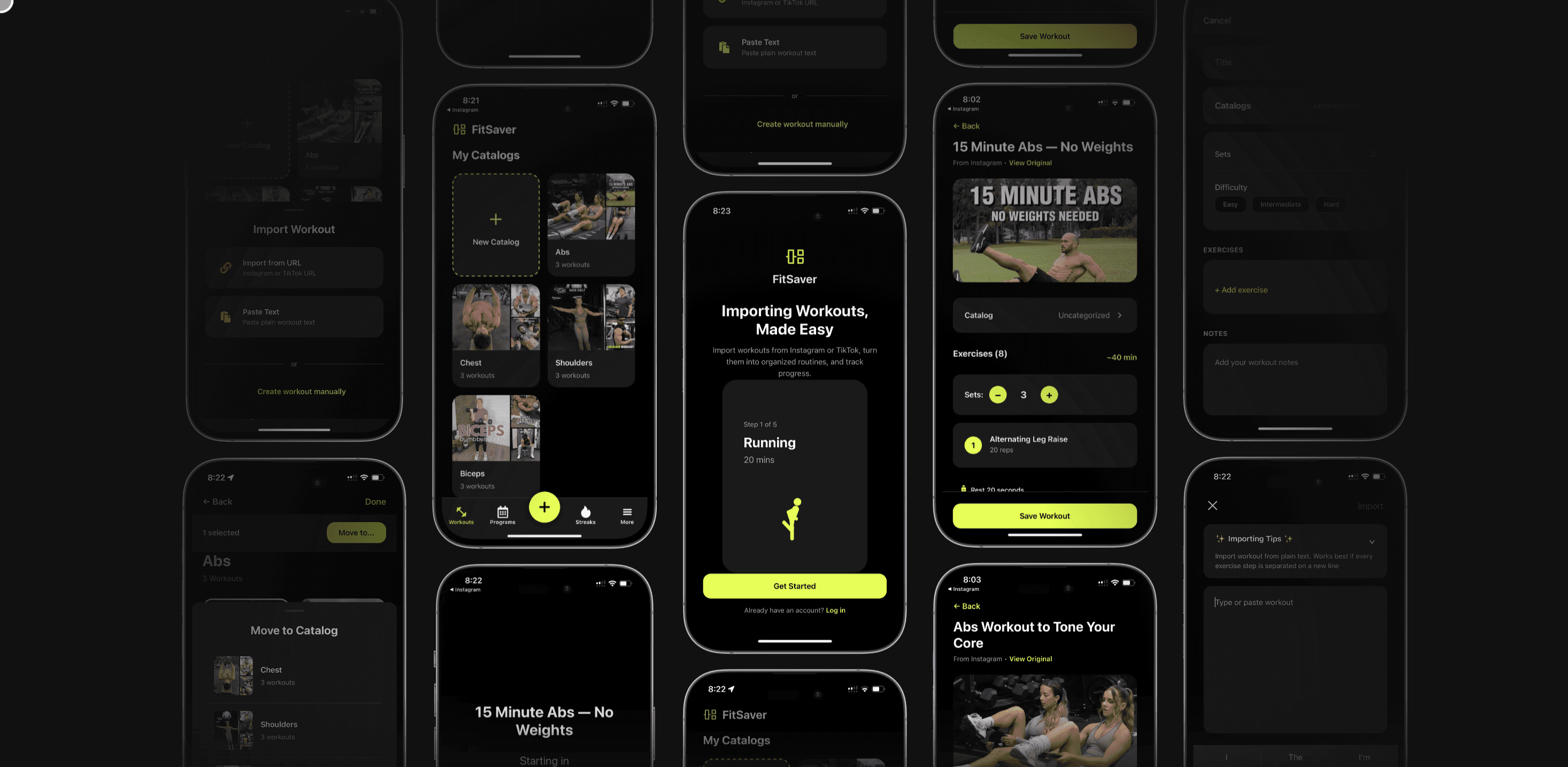
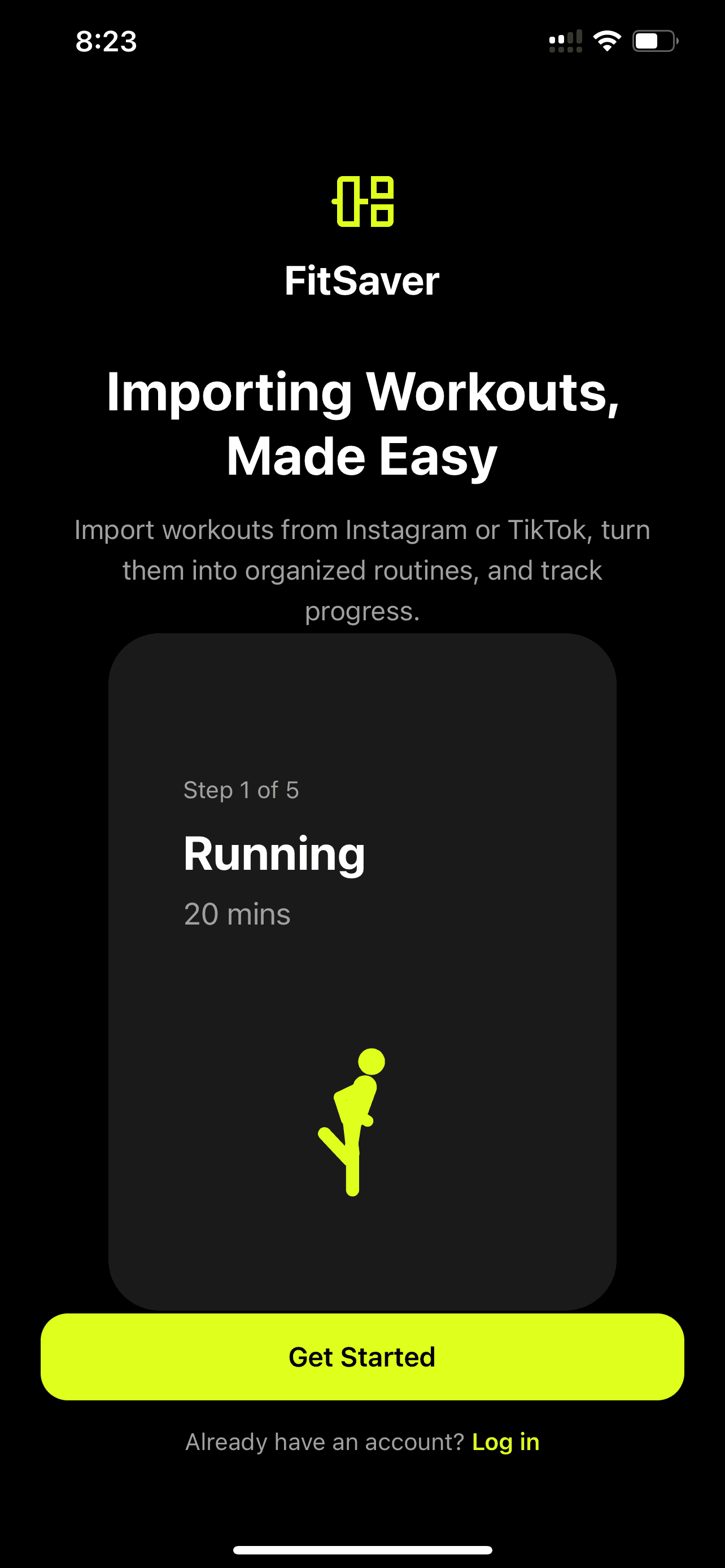
Many people save short-form workouts on Instagram or TikTok but never actually do them because the videos aren't structured for an entire session. That’s where a workout organizer app like Fitsaver shines. Fitsaver transforms those clips into full, scheduled routines that are ready to execute — and the app can send reminders so users stop scrolling and start training.
How the Conversion Works (Practical Example)
Imagine a saved 45-second TikTok showing a 4-exercise HIIT circuit. Fitsaver extracts the movements and creates a routine: warm-up, 4 exercises with suggested sets/reps/rest, and a cooldown. It then lets users schedule that routine as a 20 or 30-minute session and set reminders. The result: a saved video becomes a clear, actionable workout in the calendar.
Why Structured Routines Improve Follow-Through
Clarity: Users know exactly what to do and for how long.
Progression: Workouts can be adjusted in intensity or volume over time.
Accountability: Scheduled sessions are easier to track and measure.
Step-By-Step: Setting Up Workout Reminders and Scheduling
Here’s a practical checklist to convert intention into action. It’s written for a social-savvy person who uses saved videos and a calendar, and also wants to integrate an organizer app like Fitsaver.
Choose weekly priorities: Decide days and types of workouts (strength, cardio, mobility).
Convert saved videos to routines: Use Fitsaver to import saved Instagram or TikTok content into structured workouts — add sets, duration, rest, and modifications.
Time-block in a calendar: Add the routine as a calendar event (30–60 minutes) and mark it as busy. Include location and equipment notes.
Set reminders: Use two reminders — one 30 minutes before (preparation cue) and one at start time (start now cue). If using Fitsaver, enable push notifications for session starts.
Sync devices: Connect Fitsaver to Apple/Google Calendar or a wearable for haptic alerts.
Plan fallback options: Create a short 10–15 minute "backup" routine that can be done anywhere if time runs out.
Track completion: Mark workouts complete in the app or calendar and watch weekly adherence metrics.
Sample Calendar Event Details
Title: Full-Body HIIT — 30 min (Fitsaver)
Location: Home gym
Description: Warm-up 5 min; Circuit x3: Jump Squats (12), Push-ups (10), Bent-over Rows (12), Sit-ups (15). Rest 60s between rounds.
Reminders: 30 min before (prep), 0 min (start)
Repeat: Mon/Wed/Fri
Practical Examples: How to Phrase Reminders
Wording influences action. Here are reminder templates that actually prompt movement rather than annoyance.
Prep reminder (30 min before): "6:00 PM — Pack water bottle and shoes for tonight's Legs & Core (40 min)."
Start reminder (on time): "6:30 PM — Legs & Core starts now. 5-min warm-up first — open Fitsaver to follow."
Snooze-friendly nudge: "No pressure — 10-minute version available if you're short on time."
Accountability nudge: "You're on track! Reply DONE when finished or swap to Thursday."
Overcoming Common Scheduling Challenges
Even the best plans run into obstacles. Here are solutions for the most common disruptions.
Snoozing and Ignoring Notifications
Use commitment devices: Schedule a nonrefundable class, pay for a trainer, or create a bet with friends.
Make the first step tiny: A reminder that asks someone to "Put on shoes" is easier to act on than "Workout."
Change the cue: Swap a buzzing phone with a physical trigger — the gym bag by the door, or a pre-work playlist.
Travel and Time Zone Changes
Use time-blocked windows: Instead of fixing to a clock hour, schedule a "Morning Workout Window: 6–9 a.m." and allow flexibility.
Offline backups: Save several short routines to the phone or print a routine to avoid dependence on mobile data.
Motivation Dips
Mix variety and familiarity: Alternate favorite workouts with new challenges.
Micro-goals and rewards: Celebrate milestones (10 sessions in a month) with a small non-food reward.
Injury or Illness
Adjust intensity: Swap heavy lifts for mobility or low-impact cardio. Keep the habit alive even if intensity drops.
Reschedule block: Use the app to shift sessions within a week and maintain volume over the microcycle.
Advanced Scheduling Strategies
For users who want to optimize beyond simply showing up, these strategies help structure training for long-term gains.
Periodization and Theming
Plan blocks of training with a focus: strength, hypertrophy, endurance, or recovery. Schedule mesocycles (4–8 weeks) with progressive overload and include a deload week.
Batching Workouts
Group similar workouts for efficiency. For example, schedule two heavy lower-body sessions in the early part of the week when energy is highest, and conditioning later.
Using Data to Inform Scheduling
Track effort, sleep, and readiness, then adjust schedule dynamically. If sleep quality drops, shift to an active recovery day. Fitsaver can centralize this by logging sessions and helping to visualize consistency trends.
Measuring Success: Metrics That Matter
Effective scheduling improves consistency, and consistency is measurable. Useful KPIs to track include:
Consistency Rate: Percentage of scheduled workouts completed in a week/month.
Minutes Trained per Week: Useful for time-based goals.
Progressive Overload Metrics: Increases in weight lifted, reps, or reduced rest times.
Subjective Metrics: Energy, mood, and perceived exertion.
Apps like Fitsaver help by converting saved workouts into routines and tracking completion. Seeing a streak or a weekly summary makes it easier to spot where scheduling needs to change.
Templates: Weekly Schedules for Common Profiles
Below are ready-to-use schedules. Each template includes reminder suggestions and fallback plans.
Beginner — 3-Day Full-Body (Weeks 1–8)
Mon — Full-body Strength (30–40 min). Reminders: 30 min & start.
Wed — Full-body Strength (30–40 min). Reminders: 30 min & start.
Fri — Full-body Strength (30–40 min). Reminders: 30 min & start.
Tues/Thurs/Sat — Active recovery: 20–30 min walk or mobility.
Fallback: 10–15 minute bodyweight circuit if short on time.
Intermediate — 5-Day Split
Mon — Upper Strength (45–60 min)
Tue — Lower Strength (45–60 min)
Wed — Conditioning (30 min)
Thu — Push Hypertrophy (40 min)
Fri — Pull Hypertrophy (40 min)
Sat — Mobility or light cardio (30–40 min)
Reminders: 30 min prep + start. Use Fitsaver to alternate exercise variations across weeks.
Busy Professional — 4x30-Min (Time-Efficient)
Mon — Full-body Strength (30 min)
Tue — 20-min HIIT + 10-min mobility
Thu — Upper/Lower split quick session (30 min)
Sat — Long walk or active recovery (45–60 min)
Reminders: Calendar block + wearable alert. Backup: 10-minute routine stored in Fitsaver.
Travel Routine — 3x20-Min Bodyweight
Day 1 — Circuit A: Squats, Push-ups, Plank
Day 3 — Circuit B: Lunges, Chair Dips, Mountain Climbers
Day 5 — Mobility + light cardio
Reminders: Morning window with flexible start; routines saved offline in Fitsaver.
Case Study: How Maya Reclaimed Her Workout Habit
Maya, a 27-year-old marketing coordinator, saved dozens of Instagram workouts but rarely completed them. She often felt overwhelmed deciding which video to do and when. Using Fitsaver, she converted her favorite saved videos into three weekly routines and scheduled them as recurring events marked “Busy” in her Google Calendar.
She set two reminders: a 20-minute prep nudge and a start notification. Fitsaver auto-generated a 10-minute fallback routine for days when she had unexpected overtime. After six weeks, Maya's consistency rate rose from 20% to 78%. She credited the clarity of converted workouts, the calendar-blocked sessions, and the simple two-step reminder system for keeping her accountable.
Integrations and Tech Tips
Syncing tools reduces friction. Recommended integrations and tips:
Calendar Sync: Connect Fitsaver to Google or Apple Calendar to show workouts alongside work meetings.
Wearable Integration: Enable vibration alerts from a smartwatch for discreet reminders.
Offline Access: Download routines for when there's no signal — crucial for travel or gym basements.
Cross-App Automation: Use shortcuts or IFTTT to trigger a playlist when a workout starts or log a session automatically to a tracker.
Common Mistakes to Avoid
Over-scheduling: Blocking too many long sessions makes plans brittle. Start small and build volume.
Vague reminders: Generic pings fail. Make each reminder actionable and specific.
Ignoring recovery: People often schedule workouts every day without rest; this leads to burnout and injury.
Not tracking: If it’s not logged, the behavior is harder to change. Mark workouts complete and review weekly.
Quick Checklist: Set Up a High-Performing Routine
Pick 3–5 priority training blocks per week.
Convert saved videos into structured workouts (use Fitsaver or a manual template).
Time-block sessions in a calendar and mark them as busy.
Create two reminders per session: prep and start.
Save a 10–15 minute fallback routine for busy days.
Track completion and review weekly to tweak schedule.
Frequently Asked Questions
How many reminders are ideal for a workout session?
Two is a practical number: one 15–30 minutes before for preparation and one at the scheduled start as the action cue. Add a single follow-up nudge (10–15 minutes after start) only if the person commonly misses starts — more reminders can create notification fatigue.
Is morning or evening better for scheduling workouts?
Both work — the best time is the one the user will actually stick to. Mornings reduce schedule conflicts and may increase long-term adherence; evenings often allow better performance due to higher body temperature and strength. Choose based on lifestyle and energy, then lock it in with reminders.
What should someone do when they consistently skip scheduled workouts?
Analyze why: Are the sessions too long? Is the timing bad? Start with shorter, low-barrier routines, adjust the time, or introduce accountability (friend, paid trainer, or public commitment). Use a fallback routine for busy days so the habit remains intact.
Can reminders help prevent injury?
Indirectly, yes. Reminders for mobility, warm-up, and planned rest days encourage recovery and proper preparation. Scheduling also helps avoid ad-hoc overtraining by ensuring intensity and volume are planned.
How can Fitsaver help with scheduling and reminders?
Fitsaver converts saved Instagram and TikTok workouts into structured routines, making them ready to schedule. The app lets users set reminders, save fallback routines, and sync workouts with calendars and wearables, turning scattered content into consistent training sessions.
Conclusion
Workout reminders and scheduling are the practical foundation of a sustainable fitness habit. They turn intentions into actions by reducing decisions, creating clear cues, and protecting time for training. For people who save social media workouts, converting those clips into structured, scheduled routines makes follow-through much easier. Apps like Fitsaver bridge the gap between inspiration and execution, helping users organize, remind, and track workouts so they can focus on training without distraction.
Start small: pick the most important workout days, convert one saved video into a routine, block the time in the calendar, and set two simple reminders. Consistency compounds — and a few well-timed nudges can turn scattered effort into real progress.
Workout reminders and scheduling are the difference between good intentions and real progress. For many fitness enthusiasts and busy people, the gap between saving a great Instagram or TikTok workout and actually doing it is full of friction: lost videos, unclear structure, calendar conflicts, and too many decisions to make on the fly. This guide walks through practical ways to design reminders, build a schedule that fits energy and life, and use tools (including the Fitsaver App) to turn scrolling into structured training.
Why Workout Reminders and Scheduling Matter
Consistency is the single strongest predictor of fitness results. A plan without reminders is just a wish; scheduling and timely nudges remove the guesswork and make follow-through automatic. Reminders act as the cue in a habit loop, and a well-crafted schedule gives the brain a predictable routine to latch onto.
Psychology and behavior science back this up. Implementation intentions — a technique that specifies where, when, and how an action will occur — dramatically increase follow-through. Instead of saying "I'll work out more," a person says, "I'll do a 30-minute strength session Monday, Wednesday, Friday at 6:30 a.m. in the living room." That's scheduling plus a reminder-able cue.
Key Benefits
Higher adherence: Scheduled sessions with reminders reduce skipping and procrastination.
Less decision fatigue: Planning removes daily choices about when and how to train.
Better progress tracking: Consistent sessions let someone measure training load and improvements.
Efficient use of time: Time-blocking workouts prevents them from being squeezed out by other commitments.
Types of Reminders and Tools
There’s no one-size-fits-all reminder. The best system uses a few complementary tools so a missed push notification doesn’t mean a missed workout. Here’s a breakdown of common reminder types and how to use them.
Common Reminder Channels
App push notifications: Immediate, customizable, and often actionable. Great for workout start prompts and follow-up cues.
Calendar events: Visible block of time in a daily schedule. Useful for treating workouts like appointments.
Wearable alerts: Discreet haptics or vibration reminders from a smartwatch or fitness tracker.
SMS / Email: Helpful for stronger accountability nudges or when push notifications are turned off.
Paper or physical cues: Sticky notes on a door, a packed gym bag by the front door, or a yoga mat rolled out — tactile cues are surprisingly effective.
Choosing Tools Based on Lifestyle
Busy commuters: Calendar invites synced with Google Calendar + wearable alerts.
Social media natives who save workouts: A workout organizer app that turns saved IG/TikTok videos into scheduled routines (like Fitsaver) + push notifications.
Shift workers: Flexible reminders with recurring windows and fallback slots rather than fixed clock times.
Those needing accountability: SMS reminders or a workout buddy that sends check-ins.
Best Practices for Reminder Design
Not all reminders are created equal. The wording, timing, and actionability determine whether a reminder triggers motion or gets swiped away.
Be specific: Instead of "Work out," use "Strength: Full-body 30 min — 6:30 a.m. — Living room." Specificity reduces hesitation.
Include a micro-action: Start with "Put on shoes" or "Open Fitsaver and tap Start." Smaller first steps reduce resistance.
Time it right: Remind 15–30 minutes before the session, with a shorter "start now" nudge on the dot.
Positive tone: Use encouraging language that assumes follow-through, e.g., "Today's quick strength session — see you in 10!"
Limit frequency: Too many pings cause fatigue. One pre-workout and one “still coming?” follow-up is often enough.
// Sample reminder text
"6:30 AM — Full-body Strength (30 min). Warm-up 5 min -> 3 circuits: Squats, Push-ups, Rows. Start now?"
How to Schedule Workouts Effectively
Scheduling should reflect priorities — fitness is an important appointment with oneself, not a negotiable idea. A few smart principles simplify planning and make workouts resilient to life’s interruptions.
Time-Blocking and The Priority Rule
Time-block workouts like meetings: place them in the calendar as recurring events. The Priority Rule suggests scheduling the most important or hardest session at the time of day when energy and willpower are highest.
Morning people: Block core strength or HIIT early. Morning workouts free the rest of the day and produce early wins.
Evening exercisers: Reserve evenings for longer sessions or classes. If evenings are unpredictable, have a morning micro-workout fallback.
Split sessions: When time is tight, two 20-minute sessions (AM/PM) can work better than a cancelled hour.
Frequency and Recovery
Plan more than workouts. Schedule rest, mobility, and recovery days to allow for adaptation and avoid burnout. Typical frequency guidelines:
Beginners: 3 non-consecutive full-body sessions per week + active recovery.
Intermediate: 4–5 sessions per week, split by muscle groups or movement patterns.
Advanced: 5–6 sessions, including targeted strength, conditioning, and mobility work.
Energy-Based Scheduling (Listen to the Body)
Not every day will feel the same. Plan heavier lifts on high-energy days and conditioning when energy dips. Use a subjective energy scale (1–10) every morning and consult the schedule: if energy is low, switch to a lighter option that’s already on the plan.
Turning Saved Social Videos Into Scheduled Workouts
Many people save short-form workouts on Instagram or TikTok but never actually do them because the videos aren't structured for an entire session. That’s where a workout organizer app like Fitsaver shines. Fitsaver transforms those clips into full, scheduled routines that are ready to execute — and the app can send reminders so users stop scrolling and start training.
How the Conversion Works (Practical Example)
Imagine a saved 45-second TikTok showing a 4-exercise HIIT circuit. Fitsaver extracts the movements and creates a routine: warm-up, 4 exercises with suggested sets/reps/rest, and a cooldown. It then lets users schedule that routine as a 20 or 30-minute session and set reminders. The result: a saved video becomes a clear, actionable workout in the calendar.
Why Structured Routines Improve Follow-Through
Clarity: Users know exactly what to do and for how long.
Progression: Workouts can be adjusted in intensity or volume over time.
Accountability: Scheduled sessions are easier to track and measure.
Step-By-Step: Setting Up Workout Reminders and Scheduling
Here’s a practical checklist to convert intention into action. It’s written for a social-savvy person who uses saved videos and a calendar, and also wants to integrate an organizer app like Fitsaver.
Choose weekly priorities: Decide days and types of workouts (strength, cardio, mobility).
Convert saved videos to routines: Use Fitsaver to import saved Instagram or TikTok content into structured workouts — add sets, duration, rest, and modifications.
Time-block in a calendar: Add the routine as a calendar event (30–60 minutes) and mark it as busy. Include location and equipment notes.
Set reminders: Use two reminders — one 30 minutes before (preparation cue) and one at start time (start now cue). If using Fitsaver, enable push notifications for session starts.
Sync devices: Connect Fitsaver to Apple/Google Calendar or a wearable for haptic alerts.
Plan fallback options: Create a short 10–15 minute "backup" routine that can be done anywhere if time runs out.
Track completion: Mark workouts complete in the app or calendar and watch weekly adherence metrics.
Sample Calendar Event Details
Title: Full-Body HIIT — 30 min (Fitsaver)
Location: Home gym
Description: Warm-up 5 min; Circuit x3: Jump Squats (12), Push-ups (10), Bent-over Rows (12), Sit-ups (15). Rest 60s between rounds.
Reminders: 30 min before (prep), 0 min (start)
Repeat: Mon/Wed/Fri
Practical Examples: How to Phrase Reminders
Wording influences action. Here are reminder templates that actually prompt movement rather than annoyance.
Prep reminder (30 min before): "6:00 PM — Pack water bottle and shoes for tonight's Legs & Core (40 min)."
Start reminder (on time): "6:30 PM — Legs & Core starts now. 5-min warm-up first — open Fitsaver to follow."
Snooze-friendly nudge: "No pressure — 10-minute version available if you're short on time."
Accountability nudge: "You're on track! Reply DONE when finished or swap to Thursday."
Overcoming Common Scheduling Challenges
Even the best plans run into obstacles. Here are solutions for the most common disruptions.
Snoozing and Ignoring Notifications
Use commitment devices: Schedule a nonrefundable class, pay for a trainer, or create a bet with friends.
Make the first step tiny: A reminder that asks someone to "Put on shoes" is easier to act on than "Workout."
Change the cue: Swap a buzzing phone with a physical trigger — the gym bag by the door, or a pre-work playlist.
Travel and Time Zone Changes
Use time-blocked windows: Instead of fixing to a clock hour, schedule a "Morning Workout Window: 6–9 a.m." and allow flexibility.
Offline backups: Save several short routines to the phone or print a routine to avoid dependence on mobile data.
Motivation Dips
Mix variety and familiarity: Alternate favorite workouts with new challenges.
Micro-goals and rewards: Celebrate milestones (10 sessions in a month) with a small non-food reward.
Injury or Illness
Adjust intensity: Swap heavy lifts for mobility or low-impact cardio. Keep the habit alive even if intensity drops.
Reschedule block: Use the app to shift sessions within a week and maintain volume over the microcycle.
Advanced Scheduling Strategies
For users who want to optimize beyond simply showing up, these strategies help structure training for long-term gains.
Periodization and Theming
Plan blocks of training with a focus: strength, hypertrophy, endurance, or recovery. Schedule mesocycles (4–8 weeks) with progressive overload and include a deload week.
Batching Workouts
Group similar workouts for efficiency. For example, schedule two heavy lower-body sessions in the early part of the week when energy is highest, and conditioning later.
Using Data to Inform Scheduling
Track effort, sleep, and readiness, then adjust schedule dynamically. If sleep quality drops, shift to an active recovery day. Fitsaver can centralize this by logging sessions and helping to visualize consistency trends.
Measuring Success: Metrics That Matter
Effective scheduling improves consistency, and consistency is measurable. Useful KPIs to track include:
Consistency Rate: Percentage of scheduled workouts completed in a week/month.
Minutes Trained per Week: Useful for time-based goals.
Progressive Overload Metrics: Increases in weight lifted, reps, or reduced rest times.
Subjective Metrics: Energy, mood, and perceived exertion.
Apps like Fitsaver help by converting saved workouts into routines and tracking completion. Seeing a streak or a weekly summary makes it easier to spot where scheduling needs to change.
Templates: Weekly Schedules for Common Profiles
Below are ready-to-use schedules. Each template includes reminder suggestions and fallback plans.
Beginner — 3-Day Full-Body (Weeks 1–8)
Mon — Full-body Strength (30–40 min). Reminders: 30 min & start.
Wed — Full-body Strength (30–40 min). Reminders: 30 min & start.
Fri — Full-body Strength (30–40 min). Reminders: 30 min & start.
Tues/Thurs/Sat — Active recovery: 20–30 min walk or mobility.
Fallback: 10–15 minute bodyweight circuit if short on time.
Intermediate — 5-Day Split
Mon — Upper Strength (45–60 min)
Tue — Lower Strength (45–60 min)
Wed — Conditioning (30 min)
Thu — Push Hypertrophy (40 min)
Fri — Pull Hypertrophy (40 min)
Sat — Mobility or light cardio (30–40 min)
Reminders: 30 min prep + start. Use Fitsaver to alternate exercise variations across weeks.
Busy Professional — 4x30-Min (Time-Efficient)
Mon — Full-body Strength (30 min)
Tue — 20-min HIIT + 10-min mobility
Thu — Upper/Lower split quick session (30 min)
Sat — Long walk or active recovery (45–60 min)
Reminders: Calendar block + wearable alert. Backup: 10-minute routine stored in Fitsaver.
Travel Routine — 3x20-Min Bodyweight
Day 1 — Circuit A: Squats, Push-ups, Plank
Day 3 — Circuit B: Lunges, Chair Dips, Mountain Climbers
Day 5 — Mobility + light cardio
Reminders: Morning window with flexible start; routines saved offline in Fitsaver.
Case Study: How Maya Reclaimed Her Workout Habit
Maya, a 27-year-old marketing coordinator, saved dozens of Instagram workouts but rarely completed them. She often felt overwhelmed deciding which video to do and when. Using Fitsaver, she converted her favorite saved videos into three weekly routines and scheduled them as recurring events marked “Busy” in her Google Calendar.
She set two reminders: a 20-minute prep nudge and a start notification. Fitsaver auto-generated a 10-minute fallback routine for days when she had unexpected overtime. After six weeks, Maya's consistency rate rose from 20% to 78%. She credited the clarity of converted workouts, the calendar-blocked sessions, and the simple two-step reminder system for keeping her accountable.
Integrations and Tech Tips
Syncing tools reduces friction. Recommended integrations and tips:
Calendar Sync: Connect Fitsaver to Google or Apple Calendar to show workouts alongside work meetings.
Wearable Integration: Enable vibration alerts from a smartwatch for discreet reminders.
Offline Access: Download routines for when there's no signal — crucial for travel or gym basements.
Cross-App Automation: Use shortcuts or IFTTT to trigger a playlist when a workout starts or log a session automatically to a tracker.
Common Mistakes to Avoid
Over-scheduling: Blocking too many long sessions makes plans brittle. Start small and build volume.
Vague reminders: Generic pings fail. Make each reminder actionable and specific.
Ignoring recovery: People often schedule workouts every day without rest; this leads to burnout and injury.
Not tracking: If it’s not logged, the behavior is harder to change. Mark workouts complete and review weekly.
Quick Checklist: Set Up a High-Performing Routine
Pick 3–5 priority training blocks per week.
Convert saved videos into structured workouts (use Fitsaver or a manual template).
Time-block sessions in a calendar and mark them as busy.
Create two reminders per session: prep and start.
Save a 10–15 minute fallback routine for busy days.
Track completion and review weekly to tweak schedule.
Frequently Asked Questions
How many reminders are ideal for a workout session?
Two is a practical number: one 15–30 minutes before for preparation and one at the scheduled start as the action cue. Add a single follow-up nudge (10–15 minutes after start) only if the person commonly misses starts — more reminders can create notification fatigue.
Is morning or evening better for scheduling workouts?
Both work — the best time is the one the user will actually stick to. Mornings reduce schedule conflicts and may increase long-term adherence; evenings often allow better performance due to higher body temperature and strength. Choose based on lifestyle and energy, then lock it in with reminders.
What should someone do when they consistently skip scheduled workouts?
Analyze why: Are the sessions too long? Is the timing bad? Start with shorter, low-barrier routines, adjust the time, or introduce accountability (friend, paid trainer, or public commitment). Use a fallback routine for busy days so the habit remains intact.
Can reminders help prevent injury?
Indirectly, yes. Reminders for mobility, warm-up, and planned rest days encourage recovery and proper preparation. Scheduling also helps avoid ad-hoc overtraining by ensuring intensity and volume are planned.
How can Fitsaver help with scheduling and reminders?
Fitsaver converts saved Instagram and TikTok workouts into structured routines, making them ready to schedule. The app lets users set reminders, save fallback routines, and sync workouts with calendars and wearables, turning scattered content into consistent training sessions.
Conclusion
Workout reminders and scheduling are the practical foundation of a sustainable fitness habit. They turn intentions into actions by reducing decisions, creating clear cues, and protecting time for training. For people who save social media workouts, converting those clips into structured, scheduled routines makes follow-through much easier. Apps like Fitsaver bridge the gap between inspiration and execution, helping users organize, remind, and track workouts so they can focus on training without distraction.
Start small: pick the most important workout days, convert one saved video into a routine, block the time in the calendar, and set two simple reminders. Consistency compounds — and a few well-timed nudges can turn scattered effort into real progress.
Workout reminders and scheduling are the difference between good intentions and real progress. For many fitness enthusiasts and busy people, the gap between saving a great Instagram or TikTok workout and actually doing it is full of friction: lost videos, unclear structure, calendar conflicts, and too many decisions to make on the fly. This guide walks through practical ways to design reminders, build a schedule that fits energy and life, and use tools (including the Fitsaver App) to turn scrolling into structured training.
Why Workout Reminders and Scheduling Matter
Consistency is the single strongest predictor of fitness results. A plan without reminders is just a wish; scheduling and timely nudges remove the guesswork and make follow-through automatic. Reminders act as the cue in a habit loop, and a well-crafted schedule gives the brain a predictable routine to latch onto.
Psychology and behavior science back this up. Implementation intentions — a technique that specifies where, when, and how an action will occur — dramatically increase follow-through. Instead of saying "I'll work out more," a person says, "I'll do a 30-minute strength session Monday, Wednesday, Friday at 6:30 a.m. in the living room." That's scheduling plus a reminder-able cue.
Key Benefits
Higher adherence: Scheduled sessions with reminders reduce skipping and procrastination.
Less decision fatigue: Planning removes daily choices about when and how to train.
Better progress tracking: Consistent sessions let someone measure training load and improvements.
Efficient use of time: Time-blocking workouts prevents them from being squeezed out by other commitments.
Types of Reminders and Tools
There’s no one-size-fits-all reminder. The best system uses a few complementary tools so a missed push notification doesn’t mean a missed workout. Here’s a breakdown of common reminder types and how to use them.
Common Reminder Channels
App push notifications: Immediate, customizable, and often actionable. Great for workout start prompts and follow-up cues.
Calendar events: Visible block of time in a daily schedule. Useful for treating workouts like appointments.
Wearable alerts: Discreet haptics or vibration reminders from a smartwatch or fitness tracker.
SMS / Email: Helpful for stronger accountability nudges or when push notifications are turned off.
Paper or physical cues: Sticky notes on a door, a packed gym bag by the front door, or a yoga mat rolled out — tactile cues are surprisingly effective.
Choosing Tools Based on Lifestyle
Busy commuters: Calendar invites synced with Google Calendar + wearable alerts.
Social media natives who save workouts: A workout organizer app that turns saved IG/TikTok videos into scheduled routines (like Fitsaver) + push notifications.
Shift workers: Flexible reminders with recurring windows and fallback slots rather than fixed clock times.
Those needing accountability: SMS reminders or a workout buddy that sends check-ins.
Best Practices for Reminder Design
Not all reminders are created equal. The wording, timing, and actionability determine whether a reminder triggers motion or gets swiped away.
Be specific: Instead of "Work out," use "Strength: Full-body 30 min — 6:30 a.m. — Living room." Specificity reduces hesitation.
Include a micro-action: Start with "Put on shoes" or "Open Fitsaver and tap Start." Smaller first steps reduce resistance.
Time it right: Remind 15–30 minutes before the session, with a shorter "start now" nudge on the dot.
Positive tone: Use encouraging language that assumes follow-through, e.g., "Today's quick strength session — see you in 10!"
Limit frequency: Too many pings cause fatigue. One pre-workout and one “still coming?” follow-up is often enough.
// Sample reminder text
"6:30 AM — Full-body Strength (30 min). Warm-up 5 min -> 3 circuits: Squats, Push-ups, Rows. Start now?"
How to Schedule Workouts Effectively
Scheduling should reflect priorities — fitness is an important appointment with oneself, not a negotiable idea. A few smart principles simplify planning and make workouts resilient to life’s interruptions.
Time-Blocking and The Priority Rule
Time-block workouts like meetings: place them in the calendar as recurring events. The Priority Rule suggests scheduling the most important or hardest session at the time of day when energy and willpower are highest.
Morning people: Block core strength or HIIT early. Morning workouts free the rest of the day and produce early wins.
Evening exercisers: Reserve evenings for longer sessions or classes. If evenings are unpredictable, have a morning micro-workout fallback.
Split sessions: When time is tight, two 20-minute sessions (AM/PM) can work better than a cancelled hour.
Frequency and Recovery
Plan more than workouts. Schedule rest, mobility, and recovery days to allow for adaptation and avoid burnout. Typical frequency guidelines:
Beginners: 3 non-consecutive full-body sessions per week + active recovery.
Intermediate: 4–5 sessions per week, split by muscle groups or movement patterns.
Advanced: 5–6 sessions, including targeted strength, conditioning, and mobility work.
Energy-Based Scheduling (Listen to the Body)
Not every day will feel the same. Plan heavier lifts on high-energy days and conditioning when energy dips. Use a subjective energy scale (1–10) every morning and consult the schedule: if energy is low, switch to a lighter option that’s already on the plan.
Turning Saved Social Videos Into Scheduled Workouts
Many people save short-form workouts on Instagram or TikTok but never actually do them because the videos aren't structured for an entire session. That’s where a workout organizer app like Fitsaver shines. Fitsaver transforms those clips into full, scheduled routines that are ready to execute — and the app can send reminders so users stop scrolling and start training.
How the Conversion Works (Practical Example)
Imagine a saved 45-second TikTok showing a 4-exercise HIIT circuit. Fitsaver extracts the movements and creates a routine: warm-up, 4 exercises with suggested sets/reps/rest, and a cooldown. It then lets users schedule that routine as a 20 or 30-minute session and set reminders. The result: a saved video becomes a clear, actionable workout in the calendar.
Why Structured Routines Improve Follow-Through
Clarity: Users know exactly what to do and for how long.
Progression: Workouts can be adjusted in intensity or volume over time.
Accountability: Scheduled sessions are easier to track and measure.
Step-By-Step: Setting Up Workout Reminders and Scheduling
Here’s a practical checklist to convert intention into action. It’s written for a social-savvy person who uses saved videos and a calendar, and also wants to integrate an organizer app like Fitsaver.
Choose weekly priorities: Decide days and types of workouts (strength, cardio, mobility).
Convert saved videos to routines: Use Fitsaver to import saved Instagram or TikTok content into structured workouts — add sets, duration, rest, and modifications.
Time-block in a calendar: Add the routine as a calendar event (30–60 minutes) and mark it as busy. Include location and equipment notes.
Set reminders: Use two reminders — one 30 minutes before (preparation cue) and one at start time (start now cue). If using Fitsaver, enable push notifications for session starts.
Sync devices: Connect Fitsaver to Apple/Google Calendar or a wearable for haptic alerts.
Plan fallback options: Create a short 10–15 minute "backup" routine that can be done anywhere if time runs out.
Track completion: Mark workouts complete in the app or calendar and watch weekly adherence metrics.
Sample Calendar Event Details
Title: Full-Body HIIT — 30 min (Fitsaver)
Location: Home gym
Description: Warm-up 5 min; Circuit x3: Jump Squats (12), Push-ups (10), Bent-over Rows (12), Sit-ups (15). Rest 60s between rounds.
Reminders: 30 min before (prep), 0 min (start)
Repeat: Mon/Wed/Fri
Practical Examples: How to Phrase Reminders
Wording influences action. Here are reminder templates that actually prompt movement rather than annoyance.
Prep reminder (30 min before): "6:00 PM — Pack water bottle and shoes for tonight's Legs & Core (40 min)."
Start reminder (on time): "6:30 PM — Legs & Core starts now. 5-min warm-up first — open Fitsaver to follow."
Snooze-friendly nudge: "No pressure — 10-minute version available if you're short on time."
Accountability nudge: "You're on track! Reply DONE when finished or swap to Thursday."
Overcoming Common Scheduling Challenges
Even the best plans run into obstacles. Here are solutions for the most common disruptions.
Snoozing and Ignoring Notifications
Use commitment devices: Schedule a nonrefundable class, pay for a trainer, or create a bet with friends.
Make the first step tiny: A reminder that asks someone to "Put on shoes" is easier to act on than "Workout."
Change the cue: Swap a buzzing phone with a physical trigger — the gym bag by the door, or a pre-work playlist.
Travel and Time Zone Changes
Use time-blocked windows: Instead of fixing to a clock hour, schedule a "Morning Workout Window: 6–9 a.m." and allow flexibility.
Offline backups: Save several short routines to the phone or print a routine to avoid dependence on mobile data.
Motivation Dips
Mix variety and familiarity: Alternate favorite workouts with new challenges.
Micro-goals and rewards: Celebrate milestones (10 sessions in a month) with a small non-food reward.
Injury or Illness
Adjust intensity: Swap heavy lifts for mobility or low-impact cardio. Keep the habit alive even if intensity drops.
Reschedule block: Use the app to shift sessions within a week and maintain volume over the microcycle.
Advanced Scheduling Strategies
For users who want to optimize beyond simply showing up, these strategies help structure training for long-term gains.
Periodization and Theming
Plan blocks of training with a focus: strength, hypertrophy, endurance, or recovery. Schedule mesocycles (4–8 weeks) with progressive overload and include a deload week.
Batching Workouts
Group similar workouts for efficiency. For example, schedule two heavy lower-body sessions in the early part of the week when energy is highest, and conditioning later.
Using Data to Inform Scheduling
Track effort, sleep, and readiness, then adjust schedule dynamically. If sleep quality drops, shift to an active recovery day. Fitsaver can centralize this by logging sessions and helping to visualize consistency trends.
Measuring Success: Metrics That Matter
Effective scheduling improves consistency, and consistency is measurable. Useful KPIs to track include:
Consistency Rate: Percentage of scheduled workouts completed in a week/month.
Minutes Trained per Week: Useful for time-based goals.
Progressive Overload Metrics: Increases in weight lifted, reps, or reduced rest times.
Subjective Metrics: Energy, mood, and perceived exertion.
Apps like Fitsaver help by converting saved workouts into routines and tracking completion. Seeing a streak or a weekly summary makes it easier to spot where scheduling needs to change.
Templates: Weekly Schedules for Common Profiles
Below are ready-to-use schedules. Each template includes reminder suggestions and fallback plans.
Beginner — 3-Day Full-Body (Weeks 1–8)
Mon — Full-body Strength (30–40 min). Reminders: 30 min & start.
Wed — Full-body Strength (30–40 min). Reminders: 30 min & start.
Fri — Full-body Strength (30–40 min). Reminders: 30 min & start.
Tues/Thurs/Sat — Active recovery: 20–30 min walk or mobility.
Fallback: 10–15 minute bodyweight circuit if short on time.
Intermediate — 5-Day Split
Mon — Upper Strength (45–60 min)
Tue — Lower Strength (45–60 min)
Wed — Conditioning (30 min)
Thu — Push Hypertrophy (40 min)
Fri — Pull Hypertrophy (40 min)
Sat — Mobility or light cardio (30–40 min)
Reminders: 30 min prep + start. Use Fitsaver to alternate exercise variations across weeks.
Busy Professional — 4x30-Min (Time-Efficient)
Mon — Full-body Strength (30 min)
Tue — 20-min HIIT + 10-min mobility
Thu — Upper/Lower split quick session (30 min)
Sat — Long walk or active recovery (45–60 min)
Reminders: Calendar block + wearable alert. Backup: 10-minute routine stored in Fitsaver.
Travel Routine — 3x20-Min Bodyweight
Day 1 — Circuit A: Squats, Push-ups, Plank
Day 3 — Circuit B: Lunges, Chair Dips, Mountain Climbers
Day 5 — Mobility + light cardio
Reminders: Morning window with flexible start; routines saved offline in Fitsaver.
Case Study: How Maya Reclaimed Her Workout Habit
Maya, a 27-year-old marketing coordinator, saved dozens of Instagram workouts but rarely completed them. She often felt overwhelmed deciding which video to do and when. Using Fitsaver, she converted her favorite saved videos into three weekly routines and scheduled them as recurring events marked “Busy” in her Google Calendar.
She set two reminders: a 20-minute prep nudge and a start notification. Fitsaver auto-generated a 10-minute fallback routine for days when she had unexpected overtime. After six weeks, Maya's consistency rate rose from 20% to 78%. She credited the clarity of converted workouts, the calendar-blocked sessions, and the simple two-step reminder system for keeping her accountable.
Integrations and Tech Tips
Syncing tools reduces friction. Recommended integrations and tips:
Calendar Sync: Connect Fitsaver to Google or Apple Calendar to show workouts alongside work meetings.
Wearable Integration: Enable vibration alerts from a smartwatch for discreet reminders.
Offline Access: Download routines for when there's no signal — crucial for travel or gym basements.
Cross-App Automation: Use shortcuts or IFTTT to trigger a playlist when a workout starts or log a session automatically to a tracker.
Common Mistakes to Avoid
Over-scheduling: Blocking too many long sessions makes plans brittle. Start small and build volume.
Vague reminders: Generic pings fail. Make each reminder actionable and specific.
Ignoring recovery: People often schedule workouts every day without rest; this leads to burnout and injury.
Not tracking: If it’s not logged, the behavior is harder to change. Mark workouts complete and review weekly.
Quick Checklist: Set Up a High-Performing Routine
Pick 3–5 priority training blocks per week.
Convert saved videos into structured workouts (use Fitsaver or a manual template).
Time-block sessions in a calendar and mark them as busy.
Create two reminders per session: prep and start.
Save a 10–15 minute fallback routine for busy days.
Track completion and review weekly to tweak schedule.
Frequently Asked Questions
How many reminders are ideal for a workout session?
Two is a practical number: one 15–30 minutes before for preparation and one at the scheduled start as the action cue. Add a single follow-up nudge (10–15 minutes after start) only if the person commonly misses starts — more reminders can create notification fatigue.
Is morning or evening better for scheduling workouts?
Both work — the best time is the one the user will actually stick to. Mornings reduce schedule conflicts and may increase long-term adherence; evenings often allow better performance due to higher body temperature and strength. Choose based on lifestyle and energy, then lock it in with reminders.
What should someone do when they consistently skip scheduled workouts?
Analyze why: Are the sessions too long? Is the timing bad? Start with shorter, low-barrier routines, adjust the time, or introduce accountability (friend, paid trainer, or public commitment). Use a fallback routine for busy days so the habit remains intact.
Can reminders help prevent injury?
Indirectly, yes. Reminders for mobility, warm-up, and planned rest days encourage recovery and proper preparation. Scheduling also helps avoid ad-hoc overtraining by ensuring intensity and volume are planned.
How can Fitsaver help with scheduling and reminders?
Fitsaver converts saved Instagram and TikTok workouts into structured routines, making them ready to schedule. The app lets users set reminders, save fallback routines, and sync workouts with calendars and wearables, turning scattered content into consistent training sessions.
Conclusion
Workout reminders and scheduling are the practical foundation of a sustainable fitness habit. They turn intentions into actions by reducing decisions, creating clear cues, and protecting time for training. For people who save social media workouts, converting those clips into structured, scheduled routines makes follow-through much easier. Apps like Fitsaver bridge the gap between inspiration and execution, helping users organize, remind, and track workouts so they can focus on training without distraction.
Start small: pick the most important workout days, convert one saved video into a routine, block the time in the calendar, and set two simple reminders. Consistency compounds — and a few well-timed nudges can turn scattered effort into real progress.